Setting up local delivery zones can feel like a game of strategy. You are balancing speed, distance, and cost – all while trying to keep the checkout experience seamless for your customers.
But up until now, Shopify merchants running local delivery faced a common roadblock: A single ZIP code could only belong to one delivery zone.
If you tried to add it to a second zone, you hit a wall. We heard you.
With our latest update in DingDoong Delivery Date Picker, the same ZIP code can now belong to multiple delivery zones. This gives you ultimate control over how you structure your shipping, fulfillment, and local delivery options.
The Real-World Impact: Why This Matters
This update unlocks several critical fulfillment workflows for Shopify stores:
- Tiered Shipping Options: You can now offer both “Standard Delivery” and “Express Delivery” within the exact same neighborhood.
- Flexible Fulfillment Choices: Customers in a specific radius can now actively choose between “In-Store Pickup” or “Local Delivery.”
- Advanced Regional Targeting: If you use partial prefixes, numeric ranges (e.g.,
1000:2000), or complex UK postcodes, DingDoong intelligently maps them across multiple zones without errors.
Smart Conflict Detection: No More Guesswork
We know what you’re thinking: “Won’t overlapping ZIP codes mess up my shipping rates at checkout?”.
Not with DingDoong. We built an automatic Overlap Check engine directly into your dashboard. If a ZIP code accidentally or intentionally ends up in more than one zone, the app immediately flags it with a warning icon (⚠️).
By clicking “Show Details,” you can see exactly which zones are competing for that specific ZIP code. From there, you choose how you want the app to handle the overlap.
How It Works: Two Ways to Manage Overlaps
You have complete control over the checkout behavior. When an overlap is detected, you can choose between two main routes:
Let the Customer Choose (Turn Overlap ON)
If you intentionally want to offer multiple services to the same area (like a cheaper standard rate vs. a premium express rate), simply toggle “Allow overlapping zipcodes” to ON.
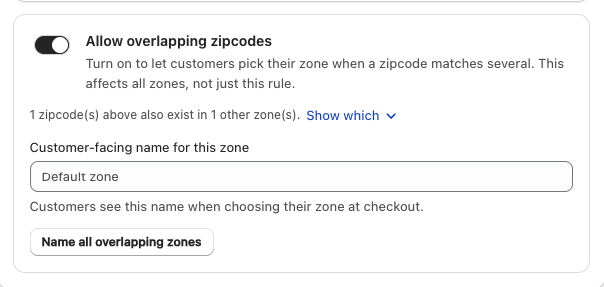
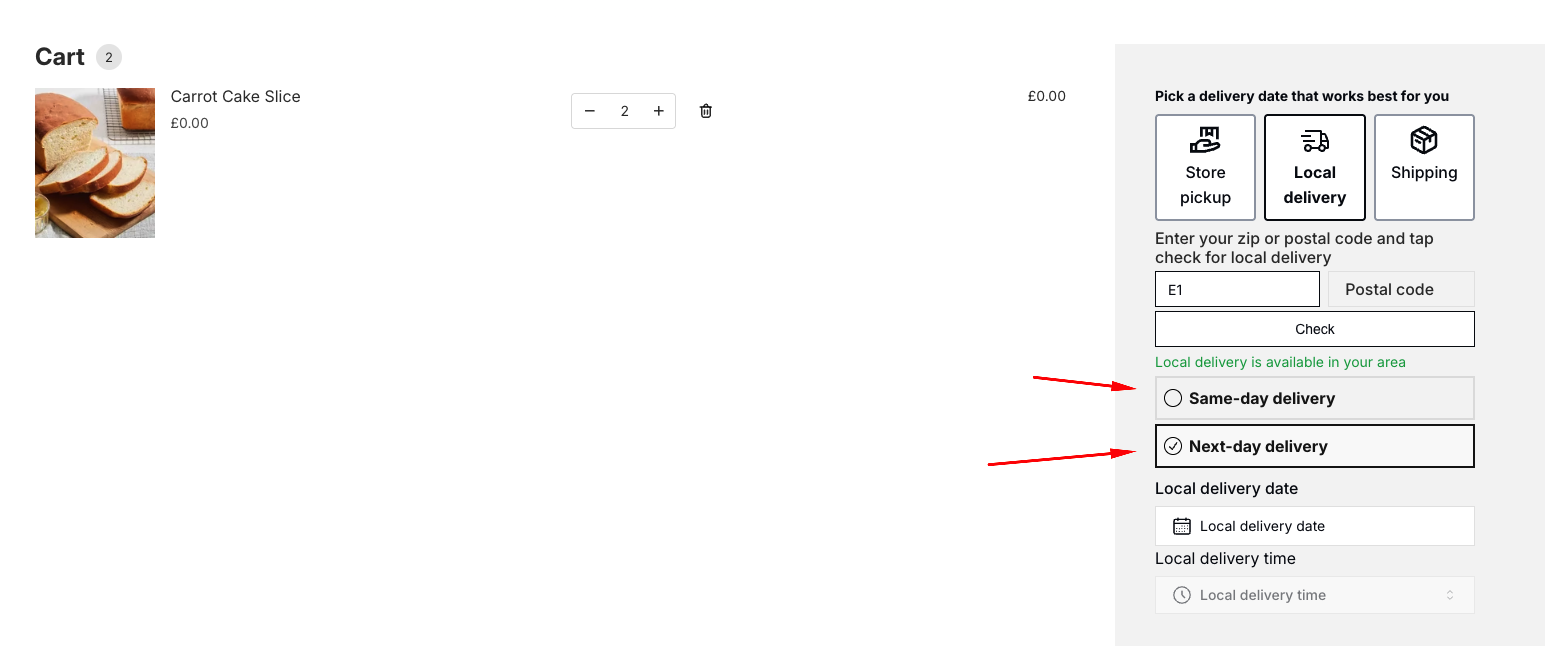
The Storefront Experience: At checkout, the customer enters their ZIP code and is presented with a clear choice of your matching delivery zones, sorted by the priority order you set.
Keep One Winning Zone (Leave Overlap OFF – Recommended for clean rates)
If the overlap was just an honest data-entry mistake, keep the toggle OFF. DingDoong will block the settings from saving until the conflict is resolved, protecting you from incorrect checkout fees.
The Storefront Experience: You can open the Priority Modal and drag your preferred zone to the top. The top zone receives a “Wins shared zipcodes” badge. A customer entering that ZIP code will only see the rates and rules for that top-ranked zone.
Best Practices for Merchants
Keep overlap OFF by default: Unless you specifically want customers to choose between two distinct shipping tiers, keep the toggle off. This keeps your delivery fees highly predictable.
Clean up duplicates entirely: If the overlap check flags an accidental duplicate, the cleanest solution is to simply delete the ZIP code from the incorrect zone.
Review before saving: The overlap check updates live based on your edits, allowing you to troubleshoot your rules before hitting publish.
Ready to optimize your delivery zones?
This feature is live right now and available across all DingDoong plans that support postal/ZIP code delivery zones. It won’t alter your existing zones automatically – it simply gives you the tools to optimize them.
Head over to your DingDoong Admin > Delivery Settings to review your zones today.
If you need a hand reviewing your delivery setup or configuring your priority tiers, hit reply to this post or ping us via live chat – our team is standing by to help you optimize your checkout!
🛍️ Ready to optimize your delivery zones?
This feature is live on every plan with postal/ZIP delivery zones. It won’t change your existing zones automatically – it just gives you the tools to layer standard, express, and pickup options exactly how you want them.Try DingDoong Free
Add a date picker to your Shopify checkout today — no developer needed.
Start free trial →