As an e-commerce merchant, you already know that what happens after checkout matters just as much as the sale itself.
The post-purchase period is a critical window. A well-timed confirmation, a friendly reminder, or a proactive follow-up can drastically reduce missed deliveries, eliminate pickup no-shows, and build unbreakable customer trust. On the flip side, leaving customers guessing about their delivery schedule is a quick way to spike customer service tickets and kill repeat purchases.
That’s why we are incredibly excited to announce that DingDoong now fully integrates with Klaviyo!
You can now automatically push real-time delivery, pickup, shipping, and storefront events from DingDoong directly into Klaviyo. No more sending generic “Your order has shipped” emails. Now, you can build deeply personalized, automated email and SMS flows based on each customer’s actual selected schedule.
Why You’ll Love the DingDoong × Klaviyo Integration
Instead of shouting into the void with generic broadcasts, this integration allows you to automate high-converting communications tied to exactly when and how customers receive their orders.
-
Send reminders at exactly the right time: Reduce missed deliveries and pickup no-shows with automatic reminders.
- Personalize every message: Include each customer’s actual delivery date and time slot for a more relevant experience.
- Turn delivery events into more sales: Automatically ask for reviews, encourage repeat purchases, or re-engage customers who couldn’t book a delivery date.
6 Ready-to-Use Automation Ideas to Steal
Not sure what to build first? Here are the highest-impact automated flows you can set up in Klaviyo using DingDoong data:
| Flow | Trigger metric | Why it works |
|---|---|---|
| Order confirmation with delivery/pickup date | scheduled (delivery, pickup, or shipping) |
Confirms the exact date/slot the moment they book – much clearer than Shopify’s generic confirmation. |
| Pre-delivery reminder | reminder |
Fires X hours before delivery (you choose the window) to ensure someone is home. |
| “Arriving tomorrow” heads-up | tomorrow |
A next-day automated heads-up so the customer can clear their schedule or porch. |
| Post-delivery follow-up & review request | completed |
Automatically asks for a review or drops a reorder discount code right after a successful fulfillment. |
| Pickup-ready reminder | pickup reminder / pickup tomorrow |
Drastically cuts down on forgotten, abandoned, or late retail pickups. |
| Availability win-back | date_not_available / zone_rejected |
Automatically follow up with shoppers who dropped off because their date wasn’t open or they fell outside your zone. |
How it Works: Server vs. Storefront Events
DingDoong passes two distinct types of data packets over to Klaviyo to give you complete tracking control:
-
Server Events (Booking Lifecycle): Tracks the journey of the order itself (
Scheduled,Rescheduled,Reminder,Tomorrow,Completed) across all three fulfillment methods (Delivery, Pickup, Shipping). -
Storefront Events (Shopper Behavior): Tracks what high-intent shoppers are doing on your site before they buy (
Widget viewed,Date selected,Zone rejected,Date not available,Surcharge applied). Perfect for analyzing drop-off and segmenting warm leads!
Quick Setup Guide: Connect in 4 Simple Steps
Good news: This integration is available on all DingDoong plans and takes less than 5 minutes to set up. Connecting Klaviyo will not change anything on your current storefront or impact existing orders; it only forwards new events moving forward.
Step 1: Grab Your Klaviyo API Keys
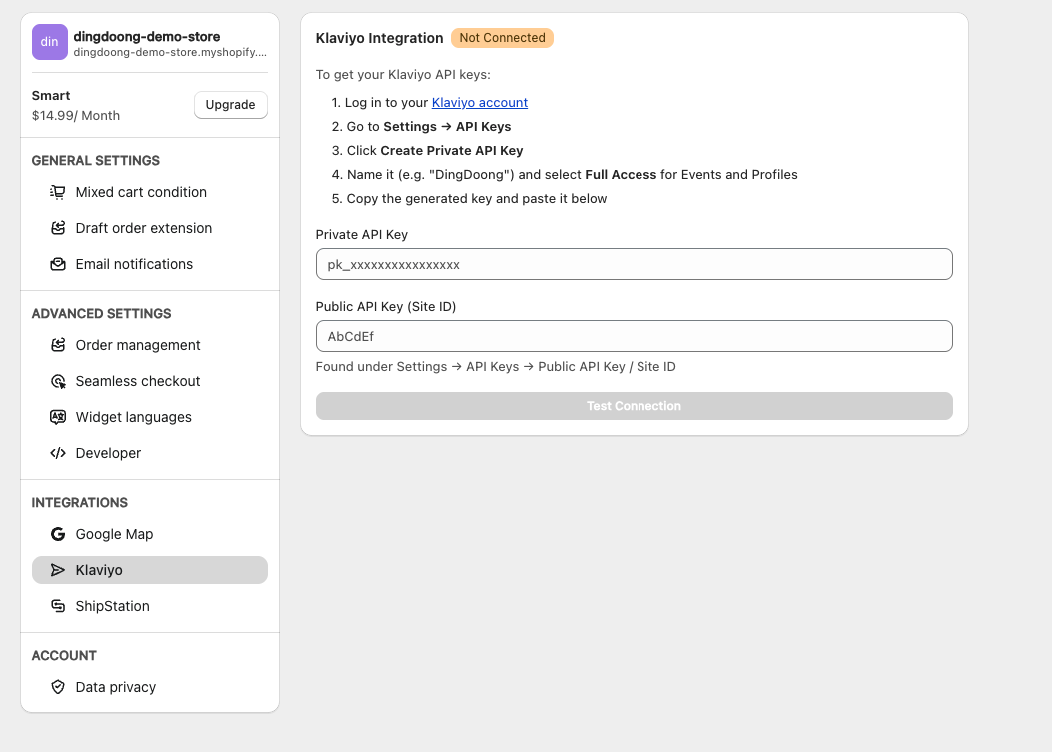
Log into your Klaviyo Admin, go to Settings → API Keys. Copy both your Public API Key (Site ID) and generate a Private API Key.
Step 2: Paste & Link in DingDoong
In your DingDoong admin, navigate to General Settings → Integrations → Klaviyo. Paste your keys into the respective fields and click Test Connection. Your status badge will flip to a satisfying green Connected state.
Step 3: Configure Your Events
Open the Event Configuration card. Toggle between the Delivery, Pickup, and Shipping tabs to check off the specific lifecycle and storefront events you want to track.
💡 PM Tip: Set your Reminder Timing (e.g., 2, 6, 12, 24, or 48 hours) to match your operational prep window. If you do same-day local pickup, a 2-hour reminder is perfect. For heavy delivery routes, go with 24 hours.
Step 4: Send Test Events (Crucial!)
Click Send Test Events. Klaviyo requires a metric to be received at least once before it shows up in your flow builder drop-down menu. Testing registers the metrics instantly so you can start building right away!
Pro-Tips for Klaviyo Flow Building
Skip the Time Delays: Because DingDoong calculates the exact timing on the server side and fires the event when it’s due (like the Tomorrow or Reminder metric), you do not need to add “Time Delay” blocks in your Klaviyo flows. Let DingDoong handle the clock!
Keep it Tidy: Only enable the events you actively plan to use. This keeps your Klaviyo Analytics dashboard clean and easy to navigate.
Leverage Smart Segments: Build a segment of “High-Frequency Bookers” (customers with multiple Completed events) and target them with exclusive VIP or subscription offers.
Need a Hand Getting Hooked Up?
We want to make sure you get the absolute most out of your post-purchase marketing. If you need help generating your API keys, setting up your first flow, or figuring out which automation makes the most sense for your operational workflow, we’ve got your back.
Simply drop us a line via our live chat in the DingDoong app or reply to our support emails. We’re here to help you scale every step of the way.
Try DingDoong Free
Add a date picker to your Shopify checkout today — no developer needed.
Start free trial →