Shopify may look like a platform for physical products, but it can also sell appointments, workshops, rentals, creative work, and other services. The key is to package each offer as a product, then add the right workflow for booking, payment, and delivery. This guide explains how to sell services on Shopify, when a booking app is needed, and what to test before taking real orders.
Can You Sell Services on Shopify?
Yes. Shopify lets a merchant create a service as a product, display a price, take payment through checkout, and manage the sale as an order. Its official guide says a service can be marked as non-physical so shipping charges don’t apply. Shopify also recommends using a booking app when customers need to choose an appointment, event, or reservation time.
That distinction matters. Shopify can handle the storefront, checkout, customer record, and order. It doesn’t turn every service product into a complete scheduling system on its own.
For example, a fixed website audit can be sold without a calendar if the customer pays first and sends the required information later. A photography session needs more: available dates, time slots, capacity, confirmation emails, and rules that stop two customers from taking the same slot.
Common services sold through Shopify include:
- Appointments, coaching sessions, and one-to-one lessons
- Classes, workshops, tours, and other group experiences
- Creative or professional packages such as design, writing, repair, or audits
- Equipment, dress, vehicle, studio, and other rentals
- Memberships, retainers, and recurring service plans
- Custom projects that begin with a quote or assessment
The platform is flexible enough for these models, but the setup should match how the service is actually delivered.
Choose the Service Model Before Building the Product
Two services can have the same price and need completely different checkout flows. Start by deciding what the customer is buying and what must happen after payment.
| Service model | A practical Shopify setup | Extra tools usually needed? |
| Fixed package | One product with a clear scope, price, and delivery time | Not always |
| Appointment | Product plus customer-selected date and time | Booking app |
| Class or workshop | Product plus schedule and capacity for each session | Booking app |
| Multi-day rental | Product plus start date, end date, availability, and turnaround time | Rental booking app |
| Custom project | Inquiry form followed by a custom draft order and invoice | Form app may help |
| Recurring service | Product with weekly, monthly, or another billing schedule | Subscription app |
9 Best Practices to Sell Services on Shopify
The process starts with a normal Shopify product, but the details need to describe an outcome rather than an item in a box.
1. Turn the service into a clear offer
“Marketing help” is hard to understand and harder to buy. “90-minute Shopify store audit with a written action plan” gives the customer a scope, format, and expected result. 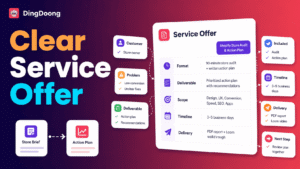
Define these points before opening Shopify:
- Who the service is for
- What problem it addresses
- What the customer receives
- What is included and excluded
- How long the session or project takes
- How the service is delivered
- What the customer needs to provide
- What happens after purchase
If the work can’t be scoped before a conversation, sell an assessment or use an inquiry-first process. Shopify draft orders can include a custom item and price, then send the customer an invoice with a secure checkout link. This makes draft orders useful for approved proposals, custom repair jobs, or projects with a price that changes by client. See Shopify’s instructions for creating draft orders.
2. Create the service as a Shopify product
From Shopify Admin, go to Products > Add product. Add a title, description, media, price, and any options the customer needs.
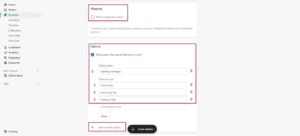
For a normal non-shippable service:
- Open the product or relevant variant.
- Find the Shipping section.
- Deactivate Physical product.
- Save the product.
This removes shipping charges from the service. Shopify documents the same process in its guide to selling services or digital products.
There is one important exception. Shopify notes that tax treatment can differ depending on what you sell and where the customer or service is located. An in-person event or service may need to be treated as a physical product with local pickup at the venue when tax must be calculated from that location. Virtual services sold to customers in the EU may also fall under digital VAT rules. Because tax requirements vary by service and jurisdiction, confirm the appropriate setup with a qualified tax professional rather than applying the same configuration to every service.
3. Build a service page that answers buying questions
A physical product can show its material, size, and color. A service is less visible, so the product page has to remove uncertainty.
Use a clear structure:
- Outcome: State what the service helps the customer achieve.
- Best fit: Explain who should book it and who should not.
- What is included: List the session, work, files, revisions, or follow-up support.
- Process: Show what happens before, during, and after the service.
- Timing: Include the session length, preparation time, and delivery window.
- Customer requirements: Ask for files, measurements, access, or other inputs early.
- Policies: Link to cancellation, rescheduling, late arrival, refund, and usage terms.
- Next step: Use one clear button such as Book now, Choose a time, or Buy this service.
Use proof that fits the service. A photographer can show a portfolio, while a workshop can show the room, materials, and class format.
Avoid promising a result the service can’t guarantee. Explain the method, scope, and deliverables instead.
4. Set prices and service options
Choose a pricing model the customer can understand before checkout.
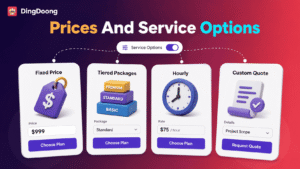
Fixed price works for a standard service with the same scope each time. Tiered packages work when customers need different levels of support. Hourly pricing can work when the booking duration controls the total. Custom pricing is better when each project needs an assessment.
Shopify variants can represent a small number of clear choices, such as:
- 30-minute or 60-minute session
- Basic, Standard, or Premium package
- In-person or virtual delivery
- One-day, three-day, or seven-day rental
Don’t use variants to hide important differences. If two packages have different audiences, processes, and deliverables, separate product pages may be clearer.
If travel, materials, rush delivery, or overtime can change the total, explain how those costs are approved.
5. Add booking, availability, and capacity rules
A booking app is needed when the customer must reserve time, a place, a staff member, or a limited asset. Shopify’s service guide specifically tells merchants to configure available times, capacity, and whether a booking recurs after installing an app.
The right rules depend on the business:
- Availability: Which days and hours can customers choose?
- Duration: How long is each booking?
- Capacity: How many people or units can one slot accept?
- Lead time: How far ahead must a customer book?
- Cutoff: When does same-day or next-day booking close?
- Blocked dates: Which holidays or private dates are unavailable?
- Buffer time: How much time is needed between bookings?
- Booking window: How far into the future can a customer reserve?
Buffer time is easy to overlook. Add buffer time between bookings for notes, cleaning, setup, or charging. Also set limits based on available staff, seats, rooms, or rental items to prevent overbooking.
6. Decide when customers pay
The simplest option is full payment at checkout. It gives the customer a confirmed purchase and reduces manual collection.
Other models may fit the service better:
- Deposit: Collect part of the price to hold a booking, then collect the balance through the documented workflow.
- Pay later: Reserve the booking and collect payment in person, if the app and business process support it.
- Custom invoice: Confirm the scope, create a draft order, and send the invoice.
- Recurring payment: Use a subscription app for memberships or repeat services.
Shopify’s own Subscriptions app can add a recurring purchase option and manage plans within Shopify Admin. But it doesn’t automatically book recurring appointments. If you accept deposits, clearly explain when the balance is due and what happens after a cancellation or no-show.
7. Add intake questions and service policies
Only ask for details you truly need to deliver the service, such as goals, contact info, measurements, files, or accessibility needs. Keep the form short, especially before payment.
If the service involves sensitive information, make sure your app and workflow meet the right privacy rules. A basic Shopify form may not be enough for health, legal, or financial records.
Service policies should cover:
- Cancellation and refund conditions
- Rescheduling limits and deadlines
- Late arrival and no-show treatment
- What is included in the price
- Extra work, revisions, or overtime
- Rental damage, loss, pickup, and return rules where relevant
- How customer information and submitted materials are used
Shopify lets merchants publish written policies under Settings > Policies. Its templates are a starting point, not a final legal review. Adjust them to the real service and local requirements.
8. Set up confirmations and delivery
After payment, the confirmation email should clearly tell customers what happens next.
Include the booking time, time zone, location or meeting link, prep steps, contact details, policy link, and when they’ll get the first update or final result. Keep the schedule in one place so emails and calendars don’t show different times.
For internal tracking, choose one simple process: leave the order unfulfilled until the service is done, use order tags, or use the booking app’s status. The key is to handle every order the same way.
9. Test the complete customer journey
Previewing the product page isn’t enough. Place a test order from the storefront and check the entire path:
- The service has no unwanted shipping charge
- Tax behavior matches the intended setup
- The date, time, duration, and time zone are correct
- A full slot or unavailable asset can’t be booked
- Discounts don’t break the booking or payment logic
- Confirmation and reminder emails contain accurate details
- Rescheduling and cancellation follow the policy
- The order appears in the correct admin and booking views
- Mobile customers can read and use the booking widget
Also test a cart that includes both a service and a physical product. Shopify may show them as separate fulfillment items, so staff need to know what must be shipped and what is only booked. Shopify also recommends assigning non-shippable products to a dedicated location, which can help keep service or digital items separate from products that require physical fulfillment.
Manage Service and Rental Bookings With DingDoong
The product setup solves only half of a scheduled-service sale. Without connected availability, a merchant may take payment for a time that is no longer open, forget the turnaround period between rentals, or update an order without updating the calendar.
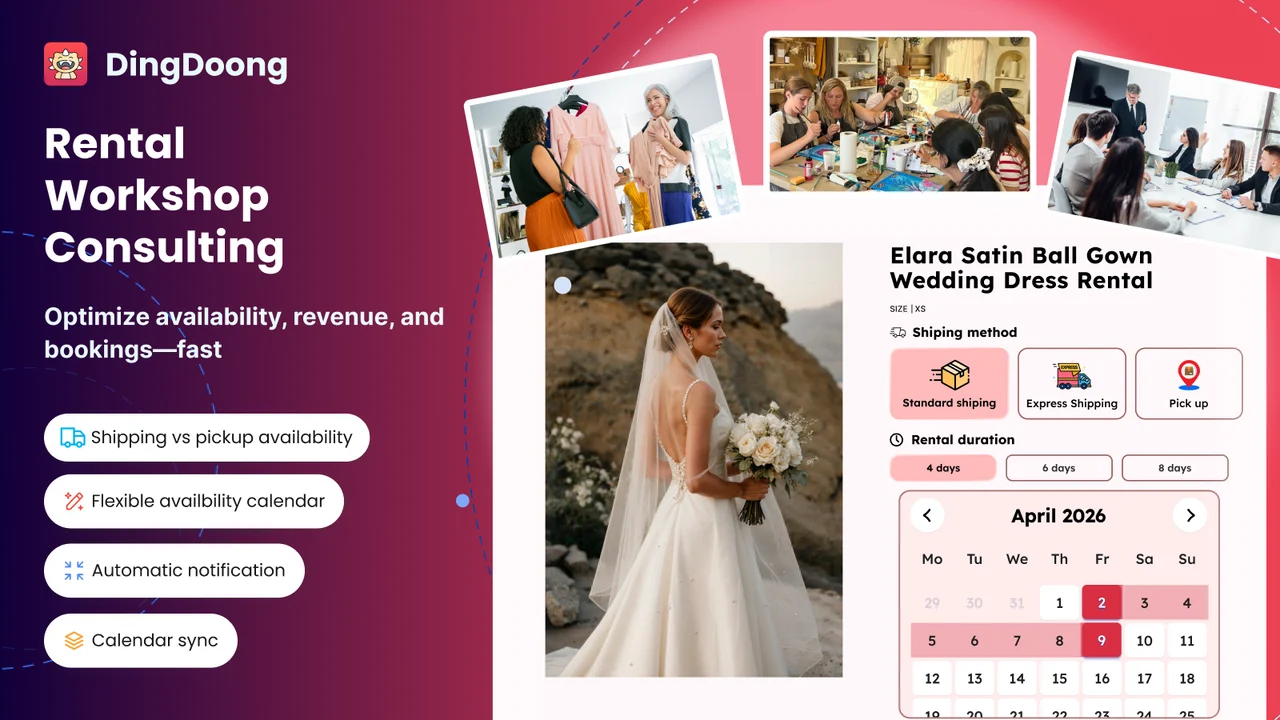
DingDoong Rental Booking Appointment connects a service to a Shopify product, so the product price, variants, checkout, and order workflow remain part of the Shopify store. It is built mainly for rentals, workshops, and bookable service experiences.
The app supports three booking patterns documented in its booking setup guides:
- Time-slot booking for studios, lessons, workshops, or hourly rentals
- Single-day booking for all-day services or one-day rentals
- Multiple-day booking for cameras, dresses, equipment, vehicles, and similar assets
Merchants can set available days, duration, capacity, blocked dates, lead time, cutoffs, future booking windows, and buffer time. The booking form can appear on the product page or in a popup. DingDoong also documents booking emails, rescheduling, booking statuses, import and export, deposits, and return-time tracking.
At the time of writing, the Shopify App Store lists the app as Free. Pricing can change, so check the current listing before installation.
DingDoong’s service-creation guide states that one product variant can belong to only one service. This prevents the same variant from receiving conflicting booking rules.
The app listing mentions consulting among its use cases, but the same service-creation documentation still shows dedicated Consulting mode as Coming soon. A consulting-only store should verify the live feature before building its workflow around that mode.
When Shopify Is Enough and When You Need an App?
Shopify can list a service, take payment, and create an order. But once customers need to choose a time, reserve a limited spot, or book a rental period, its native tools start to fall short. This table shows when Shopify is enough and when an app can save you manual work.
| Requirement | Native Shopify | Booking or service app |
| Create a service listing | Yes | Not required |
| Take a one-time payment | Yes | Not required |
| Send a custom invoice | Yes, with draft orders | Not required |
| Remove standard shipping | Yes | Not required |
| Let customers choose a date and time | No complete native workflow | Usually required |
| Limit bookings per slot | No complete native workflow | Required |
| Block dates and add buffer time | No complete native workflow | Required |
| Manage multi-day rental availability | No complete native workflow | Required |
| Send booking-specific reminders | Limited | Usually required |
| Track rental return timing | No dedicated native workflow | Rental app required |
| Charge on a recurring schedule | Requires a subscription app | Required |
Native Shopify is enough when the offer has a fixed price and does not require the customer to reserve a scarce time or asset. Add an app when the business would otherwise rely on messages, spreadsheets, or a separate calendar to decide whether the purchase can be accepted.
How to Market Services on a Shopify Store
Selling a service requires more trust than listing it. Customers can’t inspect the final result before buying, so the store needs to make the process and value easy to judge.
Lead with the outcome, then define the scope
A strong title and opening explain the result in plain language. “Product photography for 10 items” is easier to compare than “professional photography solutions.”
Show relevant proof
Use a portfolio, sample deliverables, verified reviews, qualifications, or a clear process. Choose proof that supports the specific service.
Build pages around real search needs
Create separate pages when the search intent is genuinely different, such as “beginner pottery workshop,” “private pottery lesson,” and “team pottery event.” Avoid near-duplicate pages that change only one keyword.
Shopify lets merchants edit a product’s search title, meta description, and URL handle. Use the service name, audience, or location naturally, then make sure the page gives enough information to deserve the click.
Reduce the gap between interest and booking
Put the price or pricing method, availability, duration, location, and main policy near the booking action. If customers must open several pages or send a message to learn basic details, the store isn’t offering true self-service booking.
Follow up after delivery
After the service, send the promised files or summary and request feedback at an appropriate time. A follow-up can also introduce a relevant repeat service or package.
Sell Services on Shopify Frequently Asked Questions
Can you sell services on Shopify without an app?
Yes, when the service is a fixed package that doesn’t require scheduling or another special delivery flow. Create it as a product, remove shipping where appropriate, and explain the next steps. An app is usually needed for appointments, classes, rentals, recurring billing, or automatic digital delivery.
Do customers have to pay before booking?
Not always. A store can use full payment, a deposit, payment later, or a custom invoice, depending on the booking app and business policy. The page should state when the booking becomes confirmed and when any remaining balance is due.
Can Shopify sell appointments and physical products in the same store?
Yes. A salon could sell appointments and hair-care products, while a workshop could sell seats and material kits. Test mixed carts carefully because Shopify can separate shippable and non-shippable items in the fulfillment workflow.
However, if you use the local-pickup setup for a service, customers can’t purchase that service and a product that requires shipping in the same order. Make this limitation clear on the service product page so customers know they may need to place separate orders.
Can Shopify handle recurring services?
Yes, through a subscription app such as Shopify Subscriptions or another compatible option. Recurring billing and recurring appointment scheduling are separate needs, so confirm that both workflows connect properly.
Can Shopify be used for in-person services?
Yes. Customers can book online, and a compatible setup may also take payment through Shopify POS. Check whether the booking app connects with the in-person workflow and confirm how tax should be calculated at the service location.
Start Selling Services Today!
The best way to sell services on Shopify is to keep the offer clear and make the system reflect the real operation. Use Shopify for the product page, checkout, customer, and order. Add booking or subscription tools only when the service needs scheduling, capacity, rental availability, reminders, or recurring payments.
Start with one well-defined service, test every step from product page to completion, and fix the manual gaps before adding more offers. For rentals, workshops, and scheduled experiences, D: Rental Booking Appointment can connect booking rules to the Shopify product instead of leaving the calendar and order in separate systems.
Try DingDoong Free
Add a date picker to your Shopify checkout today — no developer needed.
Start free trial →![12 Rental Dress Business Ideas [2026 Trends Updated]](https://dingdoong.io/wp-content/uploads/2026/09/rental-dress-business-ideas.png)