In the competitive world of e-commerce, standing out can be a challenge. One effective way to attract and retain customers is through the strategic use of discounts. Shopify, a leading e-commerce platform, offers a feature called automatic discounts that can be a game-changer for your online store.
Why Use Automatic Discounts in Shopify
Automatic discounts simplify the process of applying discounts for both the store owner and the customer. They eliminate the need for manual coupon codes, reducing the risk of user error and improving the overall shopping experience. By setting up discounts that automatically apply at checkout, you can increase conversion rates and encourage repeat business.
- No need to share discounts codes
- Apply automatically
- Increase AOV
- Attract new customers
Most Successful Shopify Automatic Discounts
Some of the most successful automatic discounts include:
- Buy One, Get One Free (BOGO): Encourages customers to purchase more than they initially intended.
- Volume Discounts: Rewards customers for purchasing in larger quantities.
- Time-Sensitive Promotions: Creates a sense of urgency, prompting quicker purchasing decisions.
- Minimum purchase automatic discount: Receive an automatic discount when reaching the minimum purchase threshold.
- Cart automatic discount: Enjoy automatic discounts applied directly to your cart during checkout.
- Tiered automatic discounts: Unlock increasingly larger discounts based on your total purchase amount, automatically applied as you reach each tier.
How to create automatic discounts on Shopify
Creating automatic discounts on Shopify can be done in two main ways:
Using Shopify Admin
Creating discounts on Shopify stores is easy, Shopify allows us to create some basic discounts like percentage off & free shipping discounts. For advanced discounts we can use the best Shopify discount apps available on Shopify app store.
Type of Discounts on Shopify admin:
- Product discount
- Order discount
- Buy X get Y
- Free shipping
Product Discount on Shopify
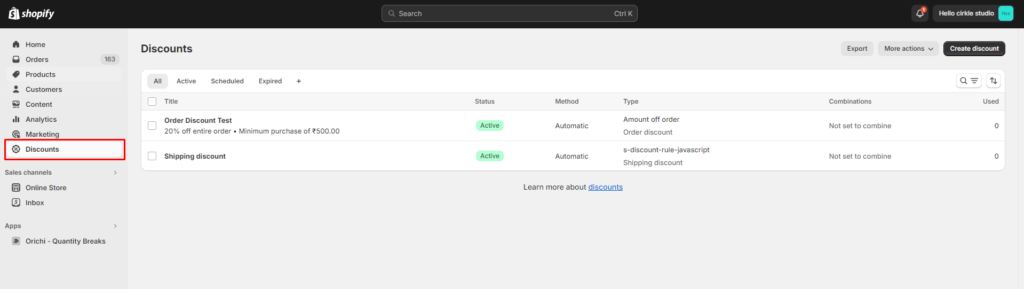
Stеp 1: In Shopify admin, go to “Discounts” in the left-hand side menu.
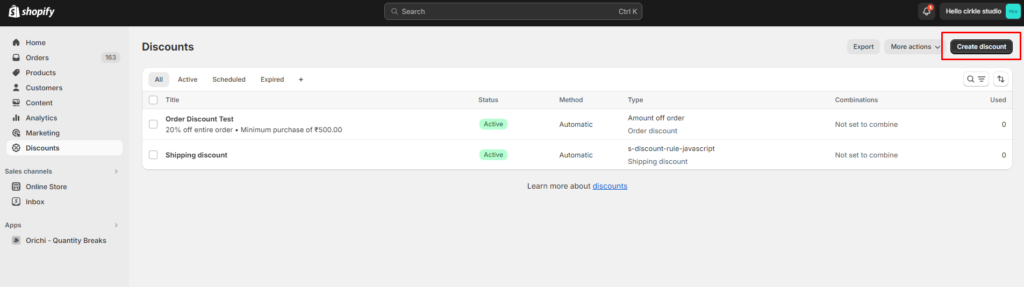
Stеp 2: In the “Discounts” area, click the “Create Discount ” button.
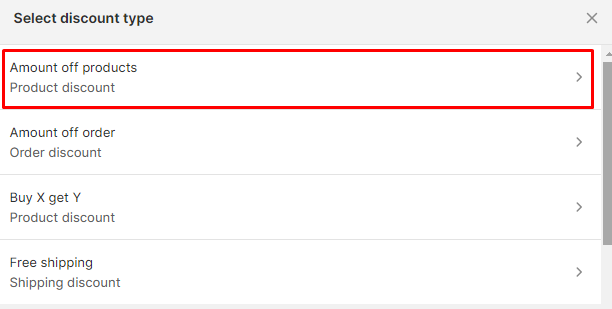
Step 3: Choose amount off products
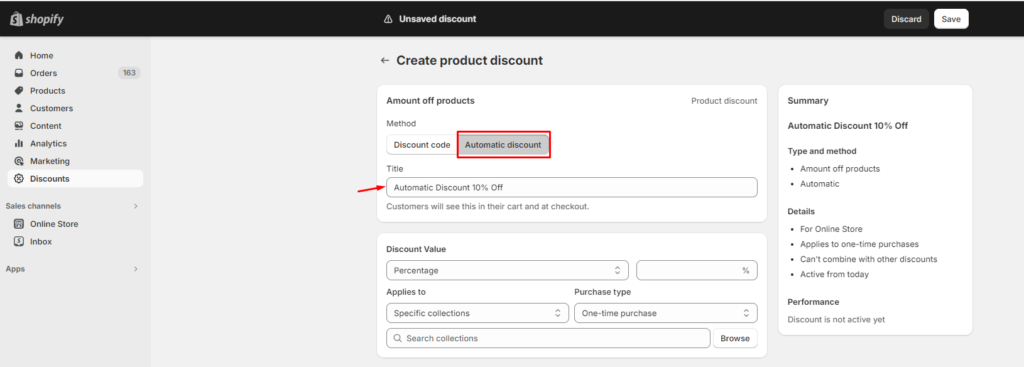
Step 4: Choose a method of discounts and title.
Select the ‘Automatic Discount‘ or ‘Discount Code’ ’method. Then choose a suitable title as this will be visible to the customers.
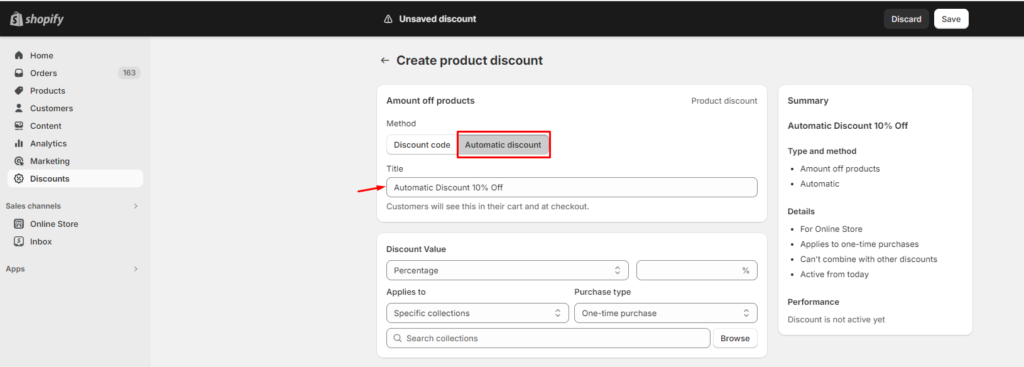
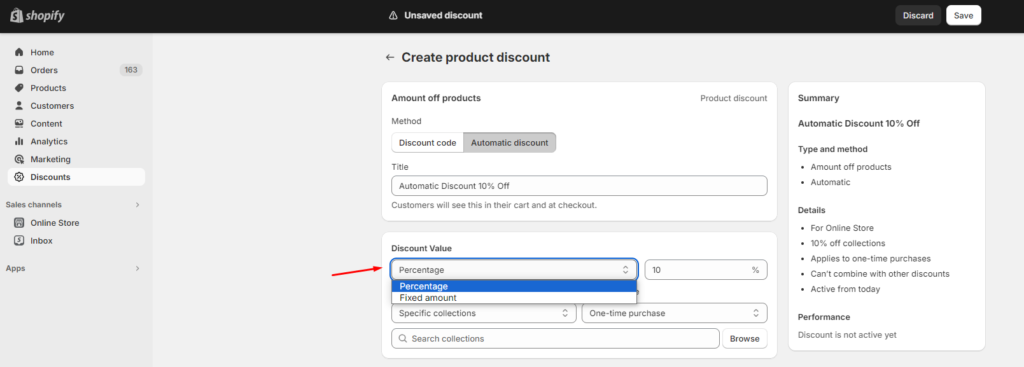
Step 5: Configure discount values
Select either ‘Percentage discount‘ to take a percentage off the product price or ‘Fixed amount‘ to subtract a set dollar value. Once selected, enter the corresponding value beside your choice.
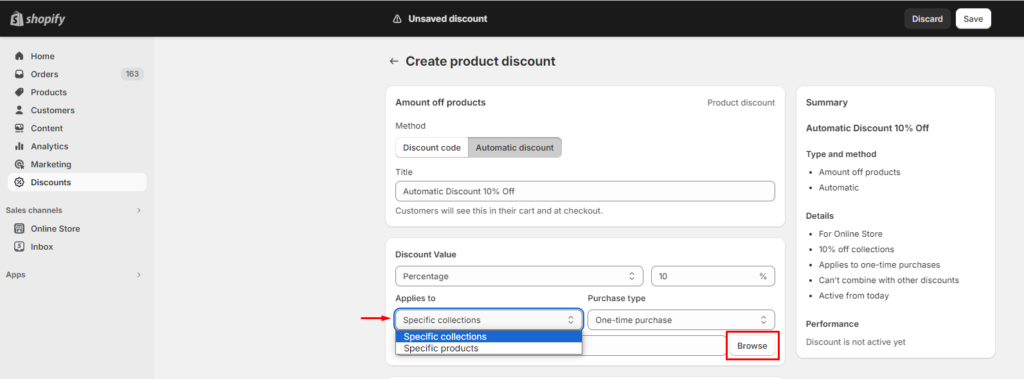
Choose where your discount applies: entire collections or individual products. Click your choice, then browse and select them directly.
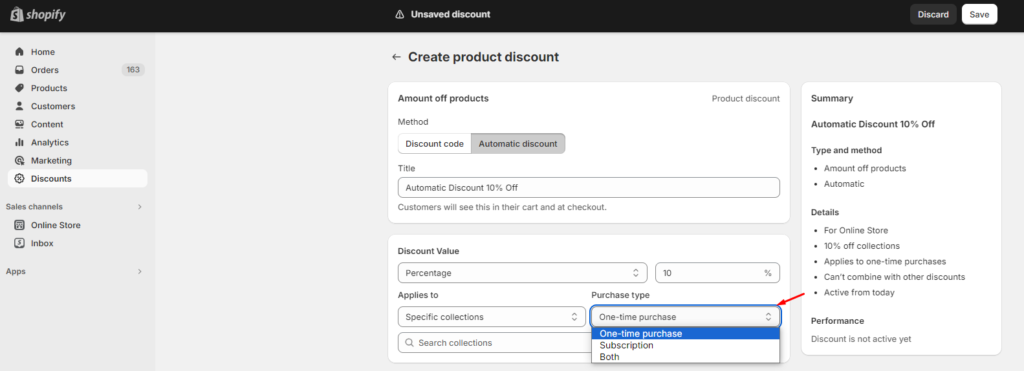
Set who the discount applies to: one-time purchases, subscriptions, or both.
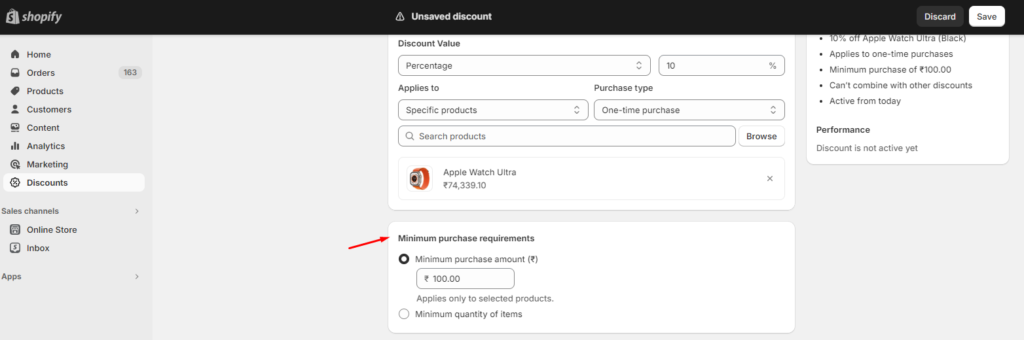
Step 6: Set Minimum Purchase Requirements
Minimum Purchase Amount: Set a minimum order total that the customer must spend for the discount to apply.
Minimum Purchase Quantity: Set a minimum number of items the customer must buy to get the discount.
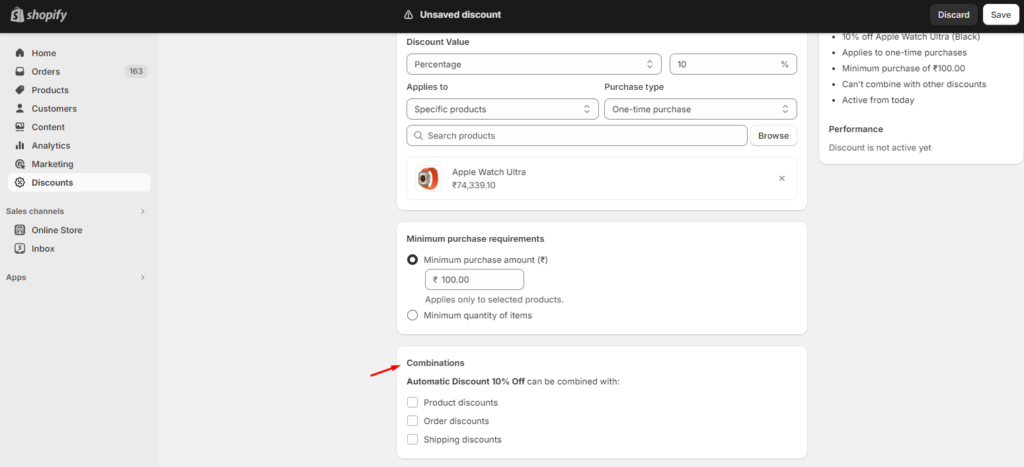
Step 7: Create Discount Combination
Now you can also combine your discounts with other discounts. In this step, you are provided with a choice to stack your specific discount types, such as product discount with other discount types like:
- Product discount
- Order discount
- Shipping discounts
Choose accordingly. If you do not wish to choose, leave this field blank.
Step 8: Setting Active Dates for the Discount
Specify the start date and time for your discount. Optionally, you can choose an end date by checking the ‘Set End Date’ box.
Review everything on the right. Once happy, click “Save Discount“.
Order Discount
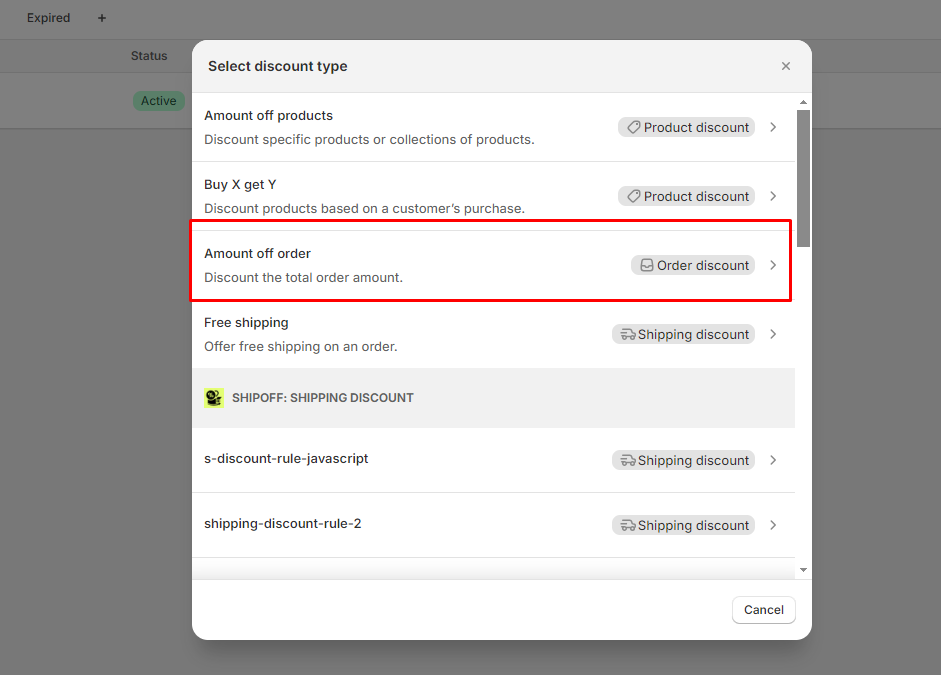
Step 1: Shopify admin > Discounts > Create discount > Choose amount off order
Step 2: Choose Method & Title
- Choose Automatic Discount
- Enter a title for your discount
- Specify the discount value, either as a percentage off or a fixed amount.
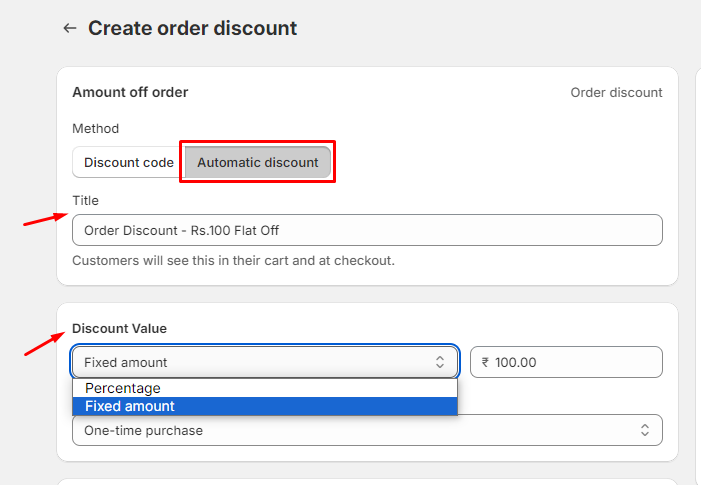
Step 3: Configure Discount Setting
- Set the condition for a minimum purchase requirement, specifying either a minimum purchase amount or a minimum quantity of items.
- Optionally, combine your discount with other discounts like product discount or shipping discounts.
- Set start and end dates.
- Final step click “Save discount”.
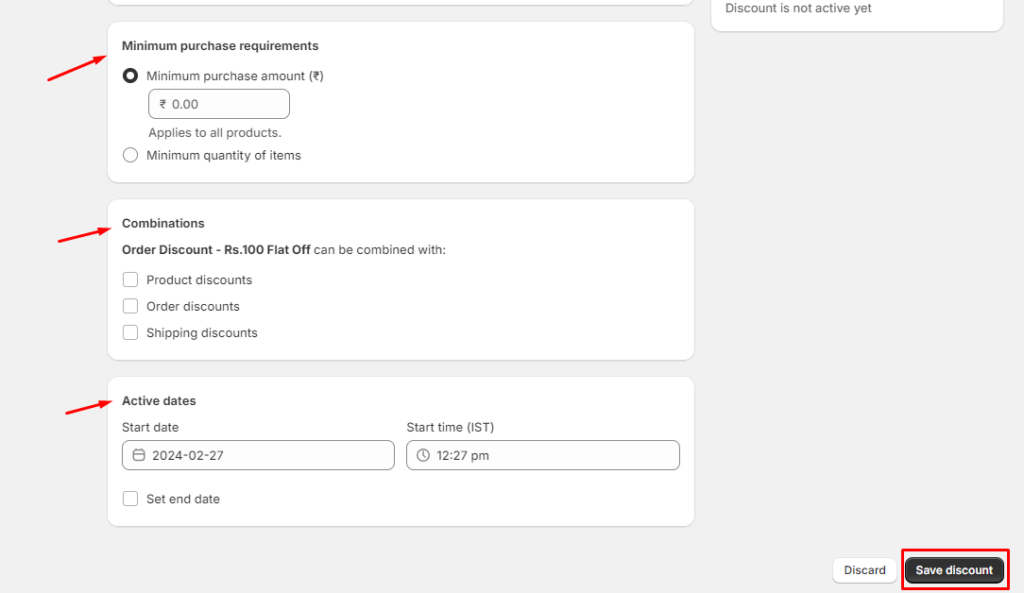
Buy X Get Y on Shopify
Step 1: Shopify admin > Discounts > Create discount > Choose
Buy X Get Y
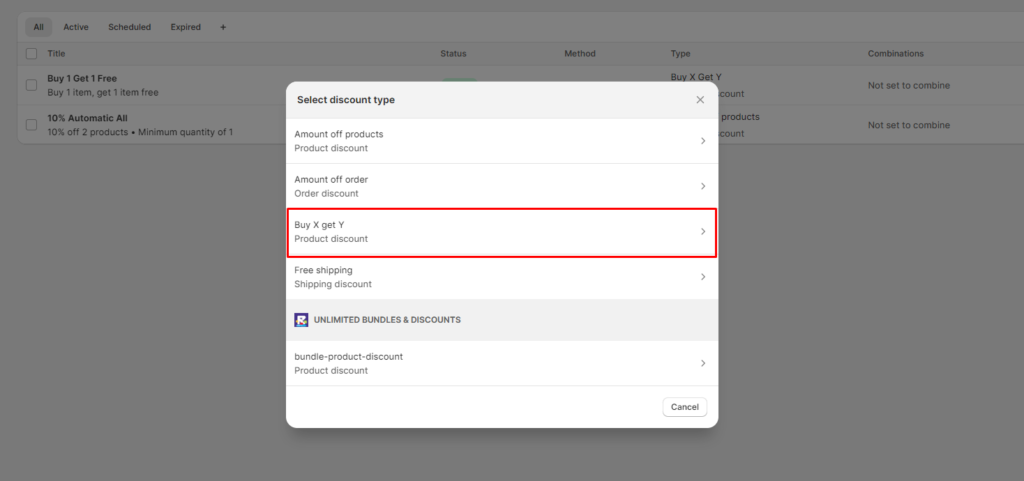
Step 2: Choose Method & Title
- Choose Automatic Discount
- Enter a Title for your discount
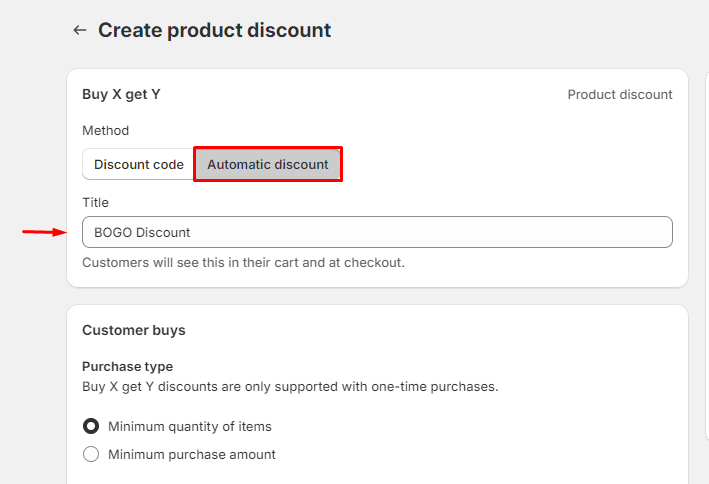
Step 3: Setting up the Buy X Part
- Select either “Minimum Quantity of Items” or “Minimum Purchase Amount“.
- Choose the quantity for minimum items or set the minimum purchase amount.
- Then, select the products or collections to which the discount will apply.
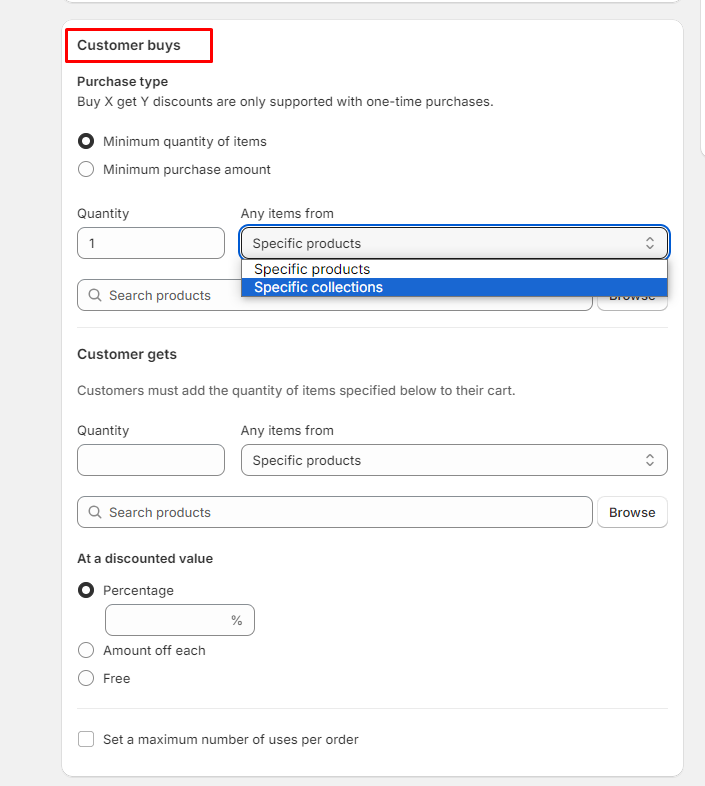
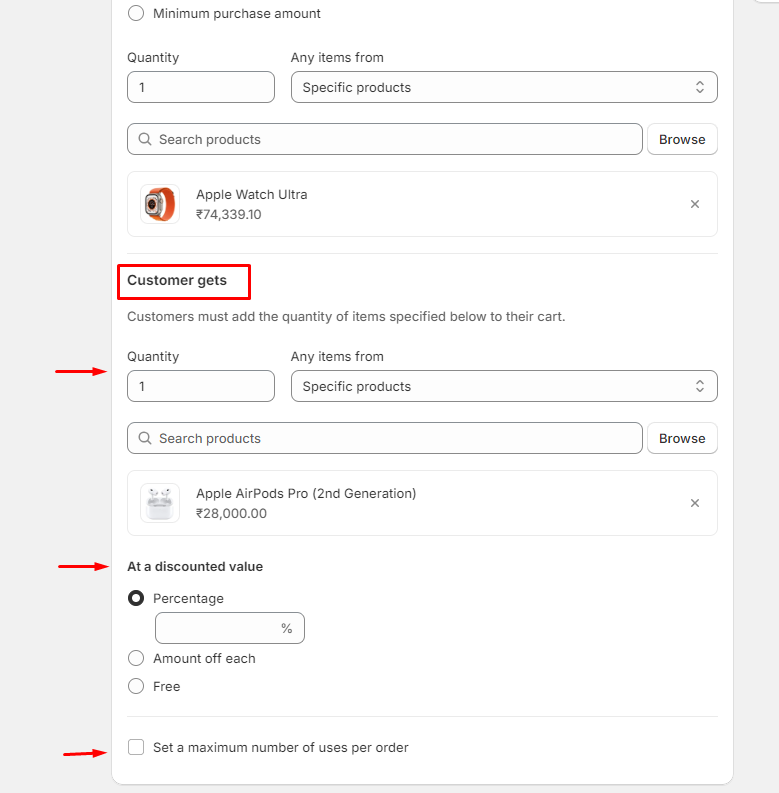
Step 4: Setting Up the Get Y Part
Under the ‘Customer gets’ section, navigate through three sub-steps:
- Step 4.1: Choose the quantity of the product and select the free/discounted product from the ‘any items from’ section.
- Step 4.2: Select the discount type: percentage off, fixed amount off, or completely free.
- Step 4.3: Set the usability limit by clicking on “Set a maximum number of uses per order” and adding the numerical amount.
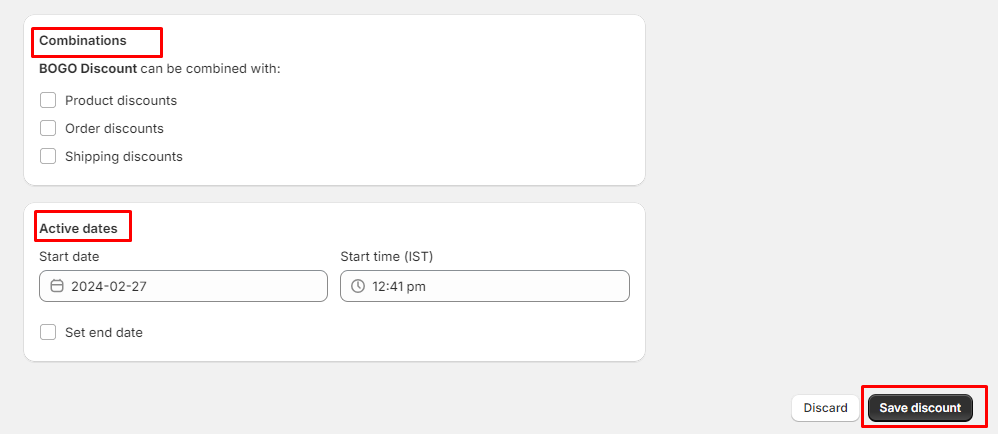
Step 5: Final Steps
You have the option to stack different types of discounts. This step allows you to combine specific discount types, such as product discount, order discount, and shipping discount
Define the valid time frame by setting a start date and time. Optionally, set an end date.
Review all details on the right-hand side of the screen, listed in bullet points, ensuring accuracy. Then, click ‘Save Discount‘.
Free Shipping Discount On Shopify
Step 1: Shopify admin > Discounts > Create discount > Choose
Free Shipping
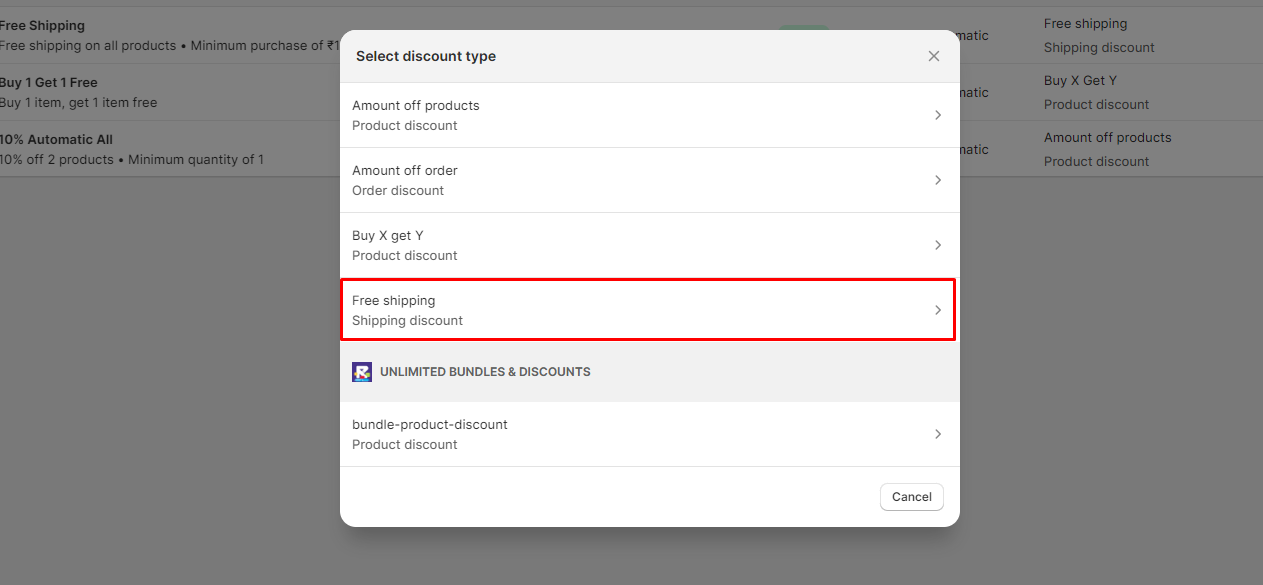
Step 2: Adding the title: Fill in an apt title for your discount.
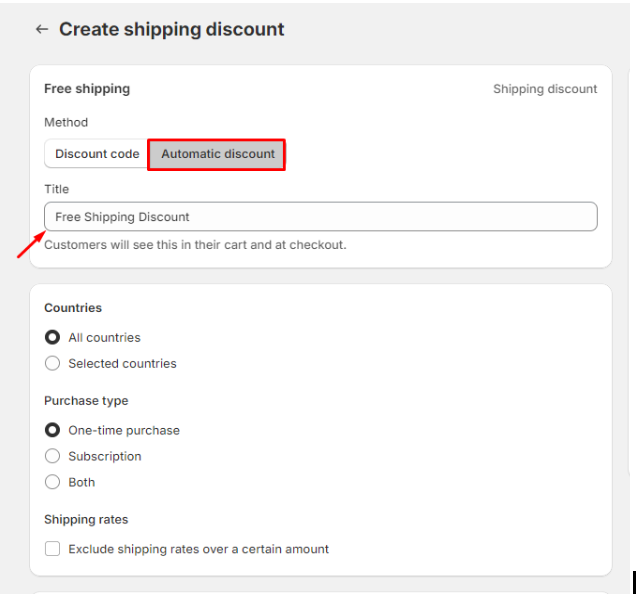
Step 3: Adding the Details
- Countries: Choose between providing worldwide free shipping or limiting it to selected countries.
- Purchase Type: Select if the discount applies to one-time purchases, subscriptions, or both.
- Shipping Rates: Set a minimum threshold for free shipping by excluding rates over a certain amount.
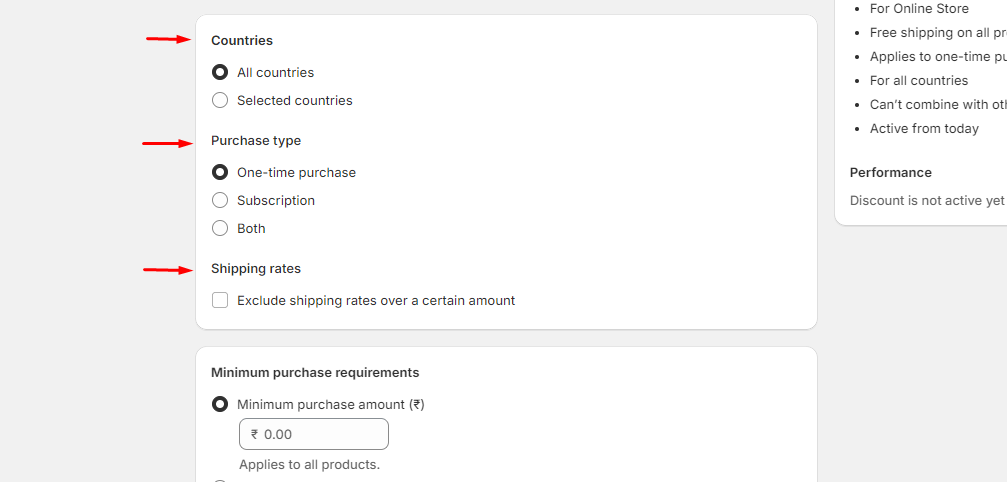
Step 4: Final Steps
- Specify a minimum purchase requirements
- Choose to stack discounts.
- Choose start and end date
- Click Save Discount.
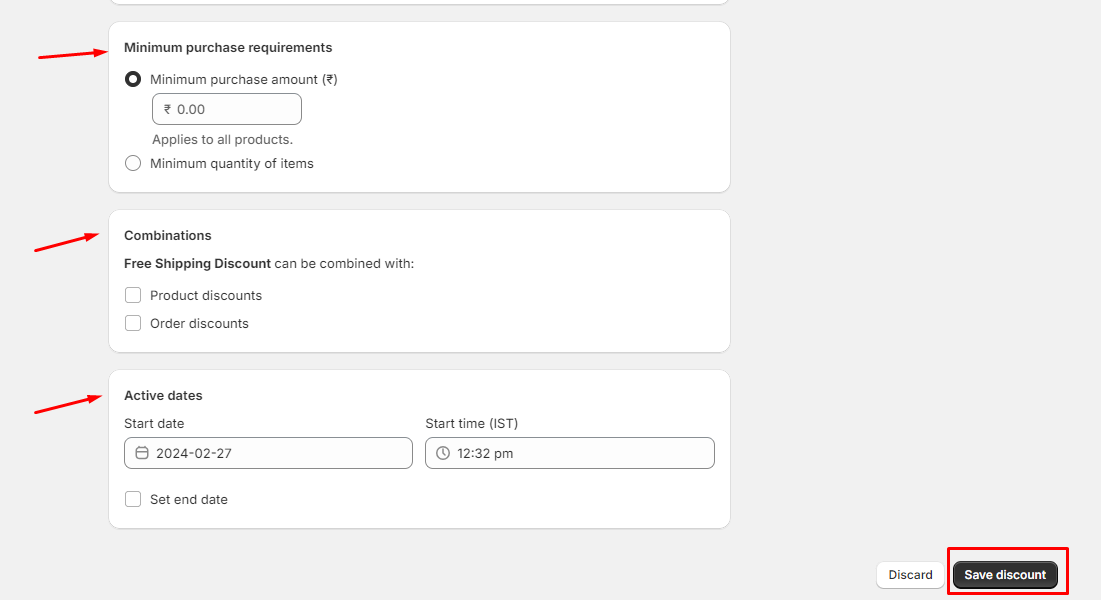
Create Advanced Automatic Discounts using Shopify Discount Apps
To make super special discounts on Shopify, you need special Shopify Discount Apps from the Shopify App Store. They have more cool stuff than regular Shopify discounts.
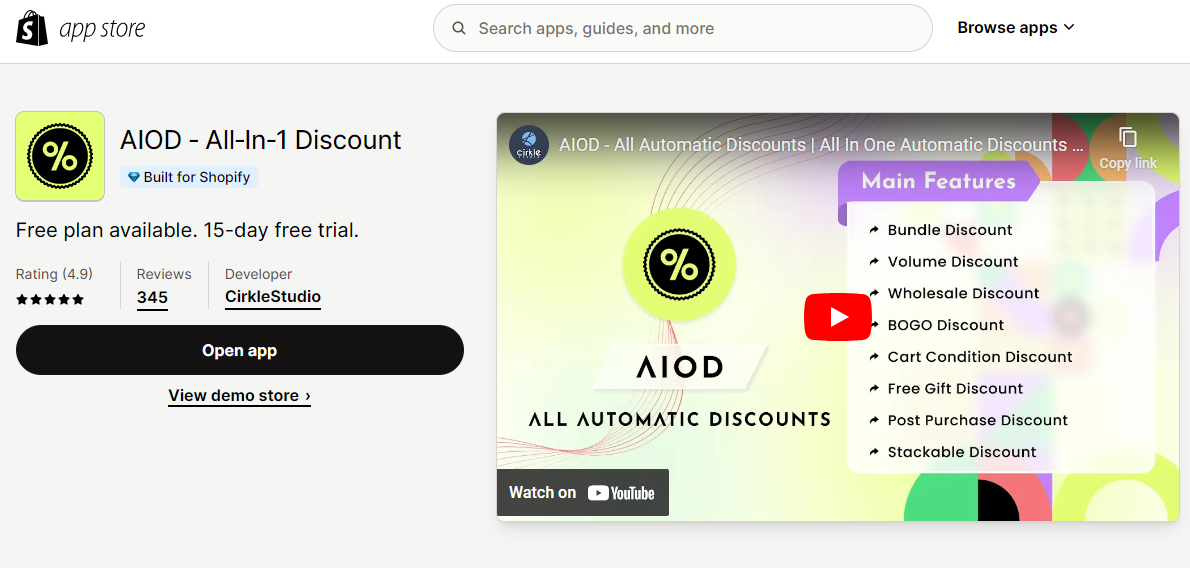
Our top pick is the AIOD – All-in-1 Discount app by Cirkle Studio. It offers over 8+ types of automatic discounts (like bundles,BOGO, volume discounts, free gifts, and more) and lets you set conditions based on things like how much is in the cart or tags for customers.
Schedule discounts as per your plans and also track discounts success by using analytics provided by the AIOD app. This app also offers a 15-day free trial.
Examples of Effective Discount Strategies
Bundling and Upselling
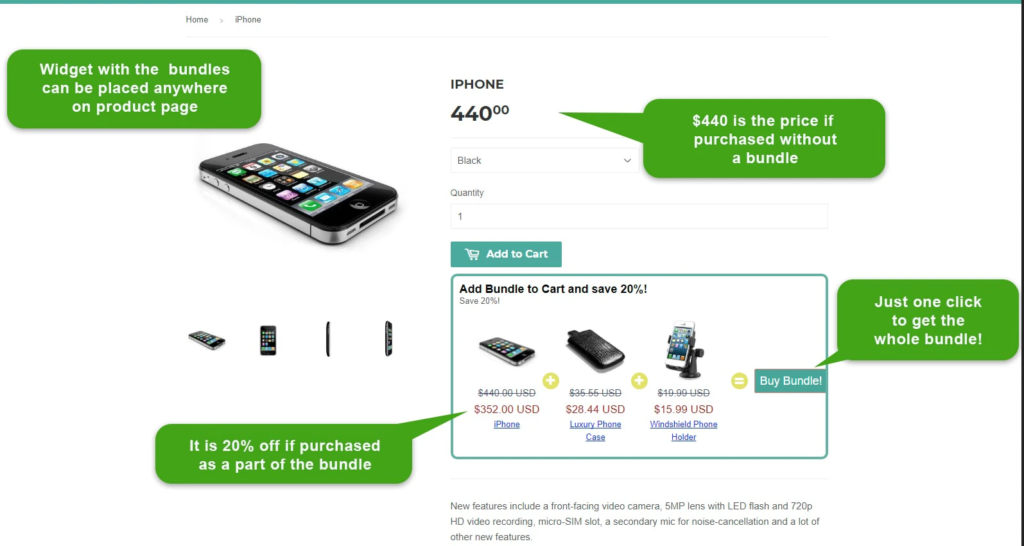
Bundling Strategy: Bundling involves offering several products together at a discounted rate compared to purchasing them individually. This strategy can significantly increase the average order value (AOV) as customers perceive they are getting a better deal, leading to higher sales volume.
Upselling Strategy: Upselling encourages customers to purchase a more expensive or upgraded version of a product they are already interested in. This can be achieved by highlighting the benefits of the premium product or by creating a sense of exclusivity.
Case Study: A Shopify store specializing in skincare products implemented both bundling and upselling strategies with great success.
Bundling Execution: The store created a bundle of a day cream, night cream, and eye serum, offering a 15% discount on the bundle compared to buying these items separately. This encouraged customers to try more products from the range.
Upselling Execution: For upselling, the store introduced a premium version of their popular moisturizer with added anti-aging benefits. They positioned this product on their product page with a comparison chart showing the additional benefits over the standard version.
Results:
-
- The bundling strategy resulted in a 25% increase in AOV.
- The upselling strategy led to a 10% conversion rate for the premium moisturizer.
- Overall, the store saw a revenue increase of 30% within three months of implementing these strategies.
Abandoned Cart Recovery
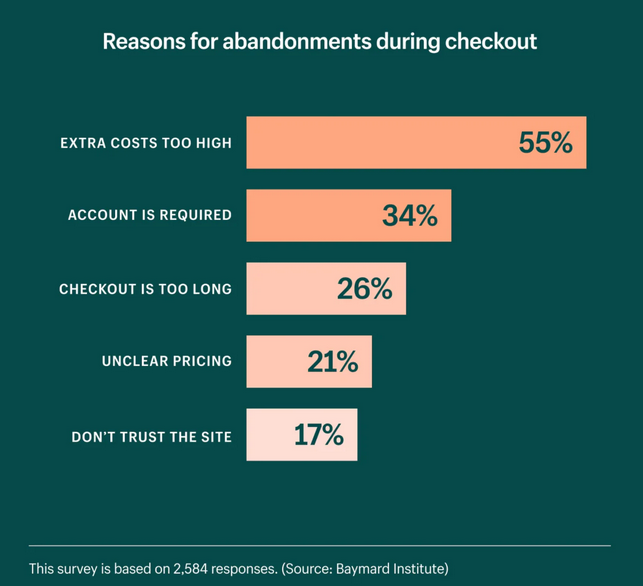
Abandoned Cart Recovery is a method used by online retailers to re-engage customers who have added items to their shopping cart but have not completed the purchase. This strategy aims to reduce cart abandonment rates and increase conversions by reminding customers of their incomplete transactions.
Case Study: A Shopify store specializing in eco-friendly home goods implemented an Abandoned Cart Recovery strategy to reclaim lost sales.
Execution: The store set up automated emails to be sent to customers who abandoned their carts. These emails included personalized messages, images of the abandoned products, and sometimes a discount code to incentivize the completion of the purchase.
Results:
- The store’s cart abandonment rate was reduced from 70% to 65%.
- The Abandoned Cart Recovery emails had an open rate of 45% and a click-through rate of 21%.
- The strategy recovered 12% of lost sales, translating to an average revenue per recipient of $5.811.
- Over a year, this amounted to a significant increase in revenue, considering the thousands of abandoned carts.
BOGO
Hygge Gear Case Study: BOGO Discount Strategy
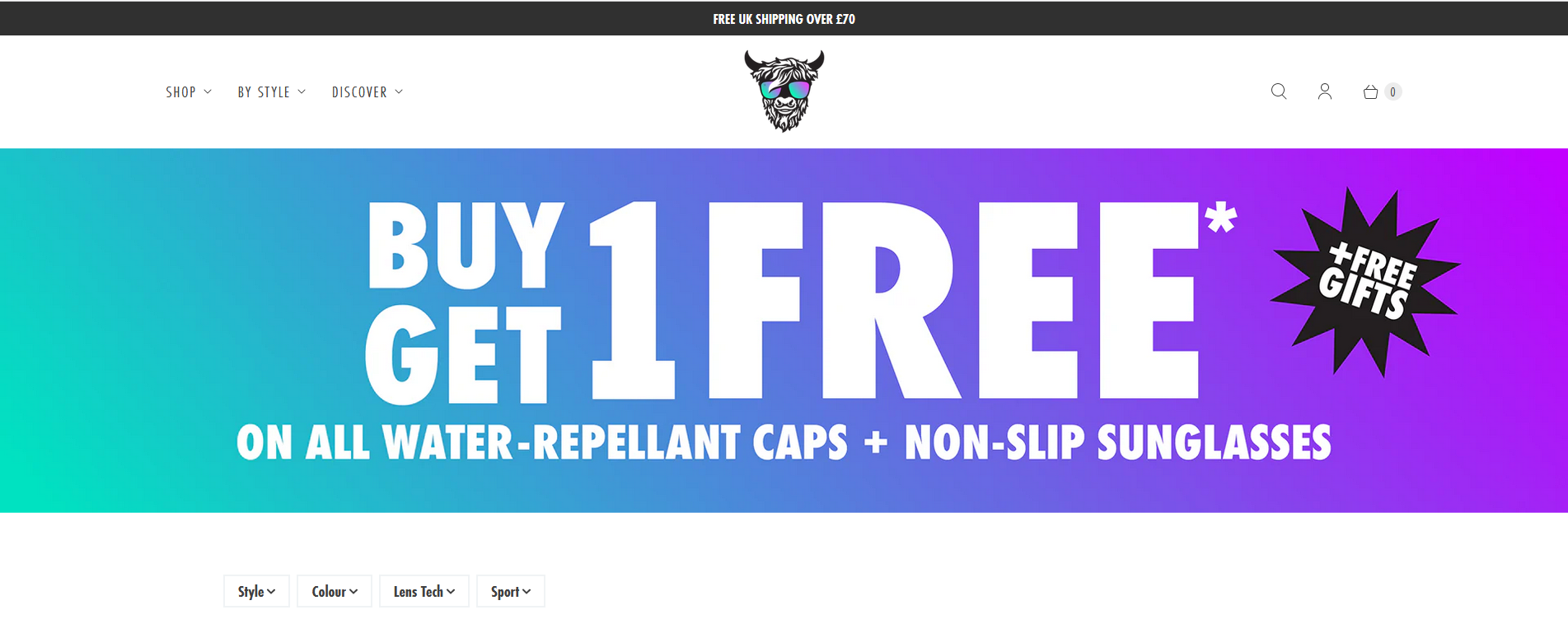
Background: Hygge Gear is a brand that specializes in multi-use headbands. They aimed to increase sales and reward their loyal customers.
Strategy: The store implemented a Buy One, Get One (BOGO) discount strategy. This allowed customers to mix and match products of their choice, turning them into creative promotions.
Execution: Hygge Gear used Shopify Scripts to automatically apply discount codes at checkout, enabling customers to take advantage of the BOGO offer without manually entering codes.
Results:
- The BOGO discount codes were a top performer for Hygge Gear.
- The flexibility of the promotion encouraged customers to purchase additional items, increasing the average order value (AOV).
- The strategy also contributed to building a stronger loyalty program, as customers appreciated the value they received.
Free gift with purchase

Free Gift with Purchase Strategy: The Free Gift with Purchase is a promotional strategy used by Shopify store owners to incentivize customers to make a purchase. This strategy aims to increase average order value, conversion rates, and customer loyalty by offering an additional product or item at no extra cost when certain conditions are met.
Case Study: A Shopify store specializing in handmade cosmetics implemented a Free Gift with Purchase strategy to boost sales and customer satisfaction.
Execution: The store set up a program where customers would receive a free gift when they spent over a certain amount. The gifts were carefully selected to complement the purchased items and were automatically added to the cart once the conditions were met. The store utilized Shopify’s built-in functionality and third-party apps to manage the logistics of the gift program effectively.
Results:
-
- The store saw an increase in average order value by 15%.
- The Free Gift with Purchase promotion had a redemption rate of 30%.
- Customer satisfaction surveys indicated a 20% increase in positive feedback mentioning the free gift.
- The strategy led to a 10% rise in repeat customer rate.
- Over six months, this strategy contributed to a significant boost in overall revenue, considering the increased average order value and repeat purchases.
Tiered discounts by spending thresholds
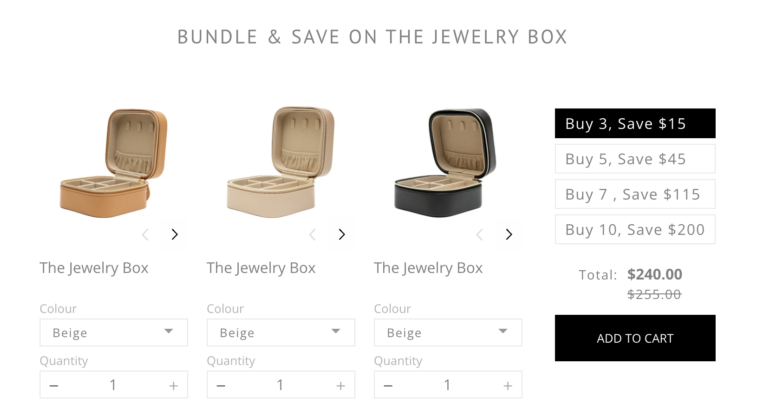
Tiered Discounts by Spending Thresholds Strategy: Tiered discounts by spending thresholds is a promotional pricing strategy used by Shopify store owners to encourage customers to spend more by offering greater discounts as they reach higher spending levels. This strategy aims to increase the average order value, clear out inventory, and reward customers for making larger purchases.
Case Study: A Shopify store specializing in fitness apparel implemented a Tiered Discounts by Spending Thresholds strategy to motivate customers to buy more.
Execution: The store created discount codes for each spending tier. For example, customers received a 10% discount on orders over $100, a 15% discount on orders over $200, and a 20% discount on orders over $300. The store displayed this information prominently on the product pages and during checkout to ensure customers were aware of the potential savings.
Results:
-
-
- The store experienced a 25% increase in average order value.
- The Tiered Discounts promotion had a redemption rate of 40%.
- The strategy led to a 15% rise in customer acquisition as new customers were attracted by the potential savings.
- Customer feedback indicated a high level of satisfaction with the savings they received.
- Over the course of a year, this strategy significantly boosted the store’s revenue, considering the increased average order value and customer acquisition rate.
-
Conclusion
Implementing automatic discounts on Shopify is a powerful strategy to drive sales and enhance customer satisfaction. By simplifying the discount process and automatically applying it at checkout, you can encourage impulse purchases and increase customer loyalty. With the step-by-step guide provided, you can easily set up and test your automatic discounts, unlocking the full potential of your Shopify store to attract more customers and boost revenue. Use default discounts of Shopify admin or get the best Shopify discounts apps from the Shopify app store. Start leveraging this feature today to see immediate results in your e-commerce business.
Read More: How To Make & Optimize One-Page Checkout For Your Shopify Store?
Try DingDoong Free
Add a date picker to your Shopify checkout today — no developer needed.
Start free trial →
![12 Rental Dress Business Ideas [2026 Trends Updated]](https://dingdoong.io/wp-content/uploads/2026/09/rental-dress-business-ideas.png)