In a world where networking can make or break opportunities, how you connect matters. Consider this: Over 75% of people now prefer digital methods of sharing contact information, such as QR codes, over traditional business cards. That’s where the QR code badge steps in—an innovative solution that merges the traditional name badge with modern technology. Whether you’re navigating a busy conference, attending an industry event, or meeting new contacts, a badge with a QR code ensures your connections are quick, easy, and memorable. Ready to see how QR code badges can change the way you network? Let’s dive in.
What is a QR Code Badge?
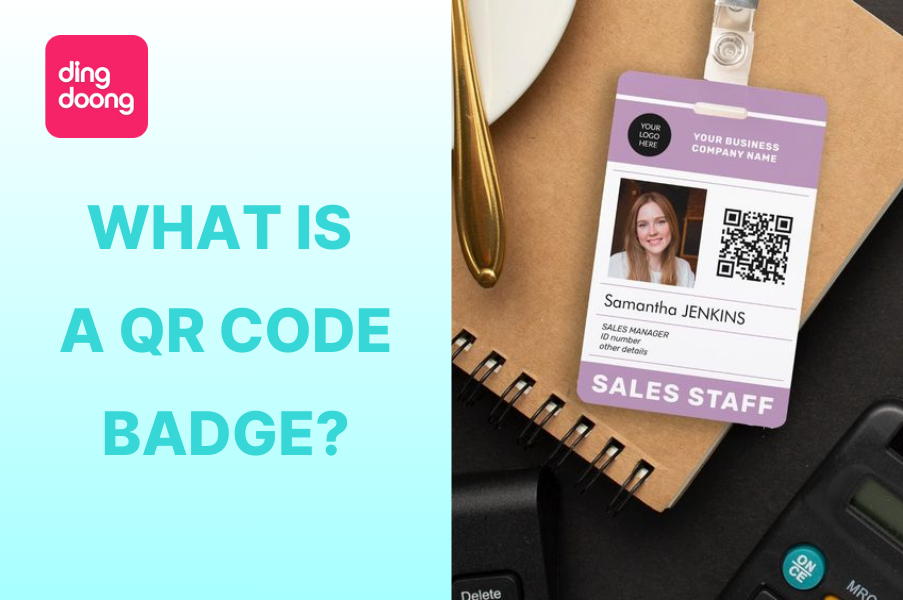 A QR code badge is a regular name badge with a QR code on it. When someone scans the QR code with their smartphone, it can take them to your website, social media profiles, portfolio, or any other digital content you want to share. A badge with QR code can make it super easy for people to connect with you digitally without the hassle of business cards or typing in contact details.
Why You Should Consider Using a QR Code Badge
Using a badge with a QR code offers numerous advantages, making it an indispensable tool for modern networking. Here are the top 5 reasons why you should use a QR code badge:
Seamless Information Sharing
With a simple scan, people can access your information instantly—whether it’s your contact details, social media profiles, or a personal website. This not only makes it easier for others to connect with you but also reduces the likelihood of information being lost or forgotten.
Enhanced Networking Efficiency
At busy events like conferences or trade shows, time is of the essence. A QR code badge allows for quick and efficient exchanges, enabling you to maximize your interactions. No more fumbling with business cards or worrying about running out—your information is always available.
Versatility Across Different Settings
The flexibility of QR code badges means they can be tailored to a variety of uses. Whether you’re sharing contact information, directing attendees to event schedules, or offering access to exclusive content, a QR code can handle it all. This makes QR code badges ideal for a wide range of industries and occasions, from corporate events to social gatherings.
Eco-Friendly Alternative
Traditional business cards pile up and waste paper. A badge QR code reduces the need for these physical materials, making your networking efforts not only more efficient but also more environmentally friendly.
How to Create an Effective QR Code Badge
Creating a QR code badge is straightforward, especially with the right tools. One excellent option is DingDoong – Free QR Code Generator, which makes the process easy and customizable. Here’s a step-by-step guide to creating a QR code badge that’s both functional and visually appealing:
Choose the right type of QR code
Different QR codes serve various purposes, and picking the right one ensures your QR code badge is effective. Here’s a quick guide:
- URL QR Codes: Directs people to a website or landing page—ideal for linking portfolios, product pages, or booking sites.
- Social Media QR Codes: Links directly to your social media profiles—perfect for growing your online presence.
- Review QR Codes: Collects review—useful for event or restaurant settings where you want to collect more Google Reviews.
- Email QR Codes: Sends a pre-written email—great for professionals who want easy communication with clients.
- SMS QR Codes: Sends a pre-written text—ideal for RSVPs, donations, or quick responses at events.
- vCard QR Codes: Shares contact details—perfect for networking at trade shows or business meetings.
- Plain Text QR Codes: Displays a simple message—useful for announcements or notices at events or schools.
Choose the QR code that best matches your goal, whether it’s driving traffic, gathering feedback, or making communication easier.
Choose the Right QR Code Generator
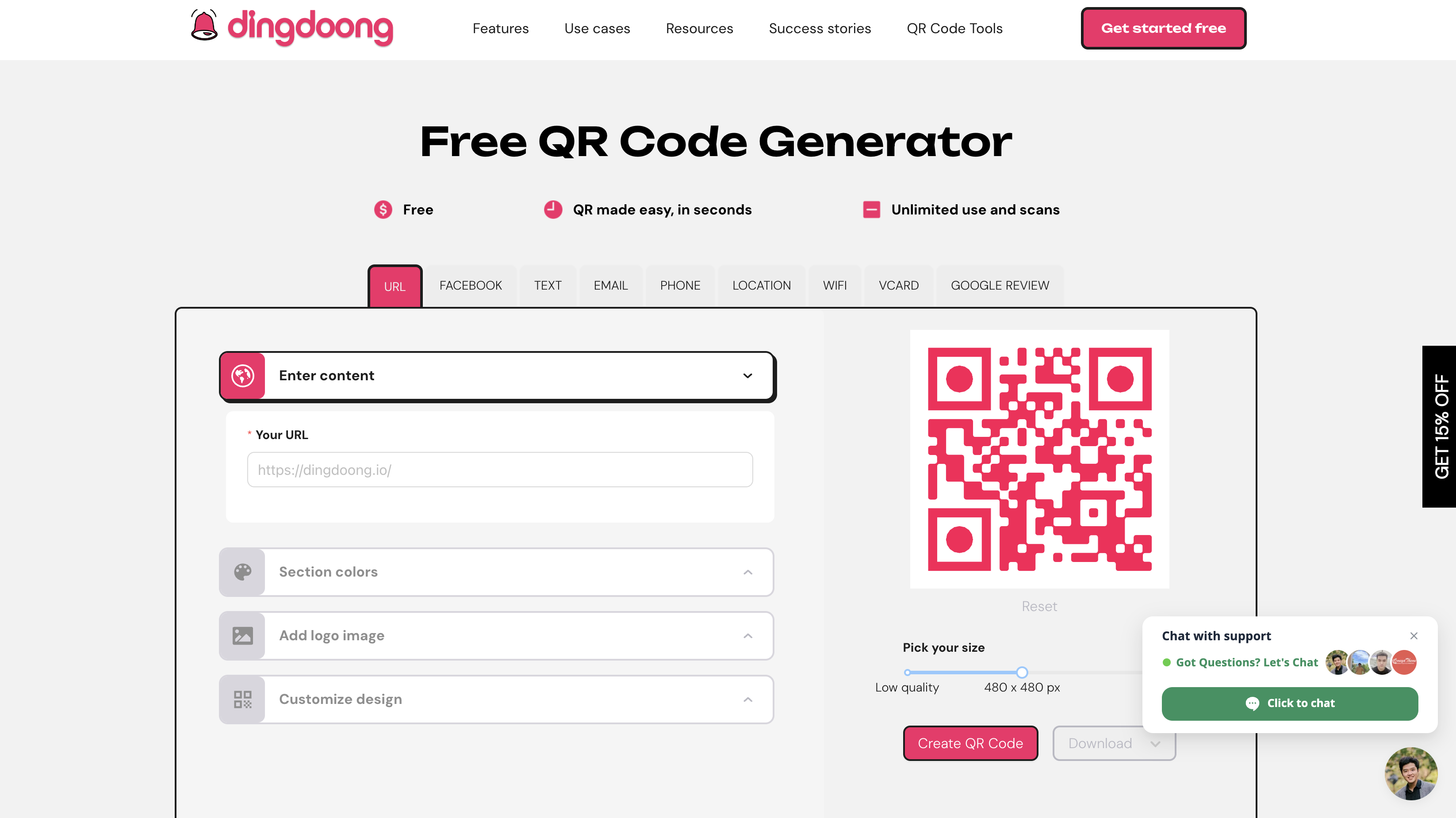
The first step in creating a QR code badge is selecting a reliable QR code generator. You can personalize your QR code by adding your logo, choosing your brand’s colors, and even tracking how many times your QR code has been scanned. This allows you to align the QR code with your brand identity while gaining valuable insights into how it’s being used.
Customize Your QR Code
Once you’ve selected your QR code generator, it’s time to customize your badge QR code. Start by picking colors that reflect your brand’s style. Make sure there’s a strong contrast between the QR code and the background so it’s easy to scan. You can also add your logo to the QR code to increase brand recognition and make the badge look more professional.
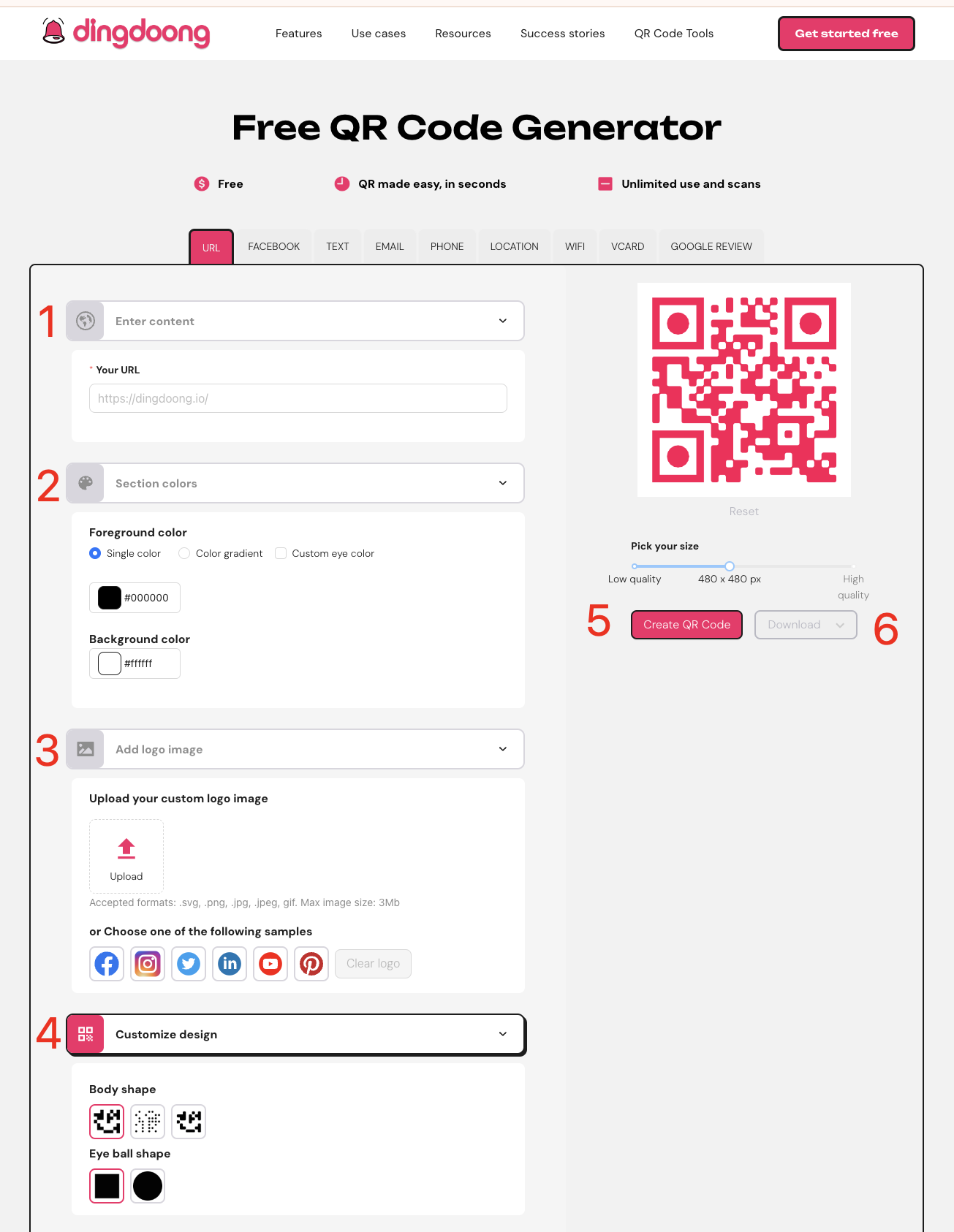
Here is it’s simple customization with DingDoong:
- Pick the Right Type: Select the QR code type that suits your banner’s purpose, such as URL, Social Media, or SMS.
- Enter Your URL or Information: Input the website link, social media profile, or other information that the QR code will direct users to.
- Customize the Design: Modify the color, add your logo, or adjust the size to match your brand’s style and ensure the QR code stands out on the banner.
- Generate the QR Code: Click the “Generate” button to create your custom QR code.
- Save and Use: Download the QR code and incorporate it into your banner design.
Optimize the Size and Placement
The placement and size of your QR code on the badge are crucial. The QR code should be large enough to be easily scanned but not so large that it overshadows your name or other important details. Typically, placing the QR code near the bottom or side of the badge works best. This positioning ensures that the QR code is accessible while still leaving room for your name, title, and company logo.
Test Your QR Code
Before you start using your QR code badge, it’s essential to test it. Make sure the QR code can be scanned quickly and easily from different angles and in various lighting conditions. Test it on multiple devices to ensure it works universally. This step is crucial for avoiding any awkward moments when someone tries to scan your code but can’t get it to work.
Take QR Code Badge In Action
QR code badges aren’t just for traditional networking—they can be used in a variety of innovative ways across different industries. Here are 5 examples of how QR codes on badges can be utilized:
Event Networking: At a busy conference or trade show, a QR code badge can link directly to your LinkedIn profile or a personal website. This makes it easy for new contacts to connect with you on the spot, ensuring you stand out from the crowd.

Employee IDs: Companies can enhance their employee badges by adding a QR code that links to a digital ID profile. This profile can include contact information, job responsibilities, and even security clearance levels, streamlining internal communication and access control.
Student Badges: Schools and universities can issue QR code badges to students that link to their class schedules, assignment portals, and important announcements. This digital integration can help students stay organized and up-to-date with school activities.
Visitor Passes: For businesses that regularly host visitors, a badge QR code can link to essential visitor information, such as Wi-Fi QR details, meeting agendas, and safety protocols. This not only enhances the visitor experience but also reduces the need for printed materials.
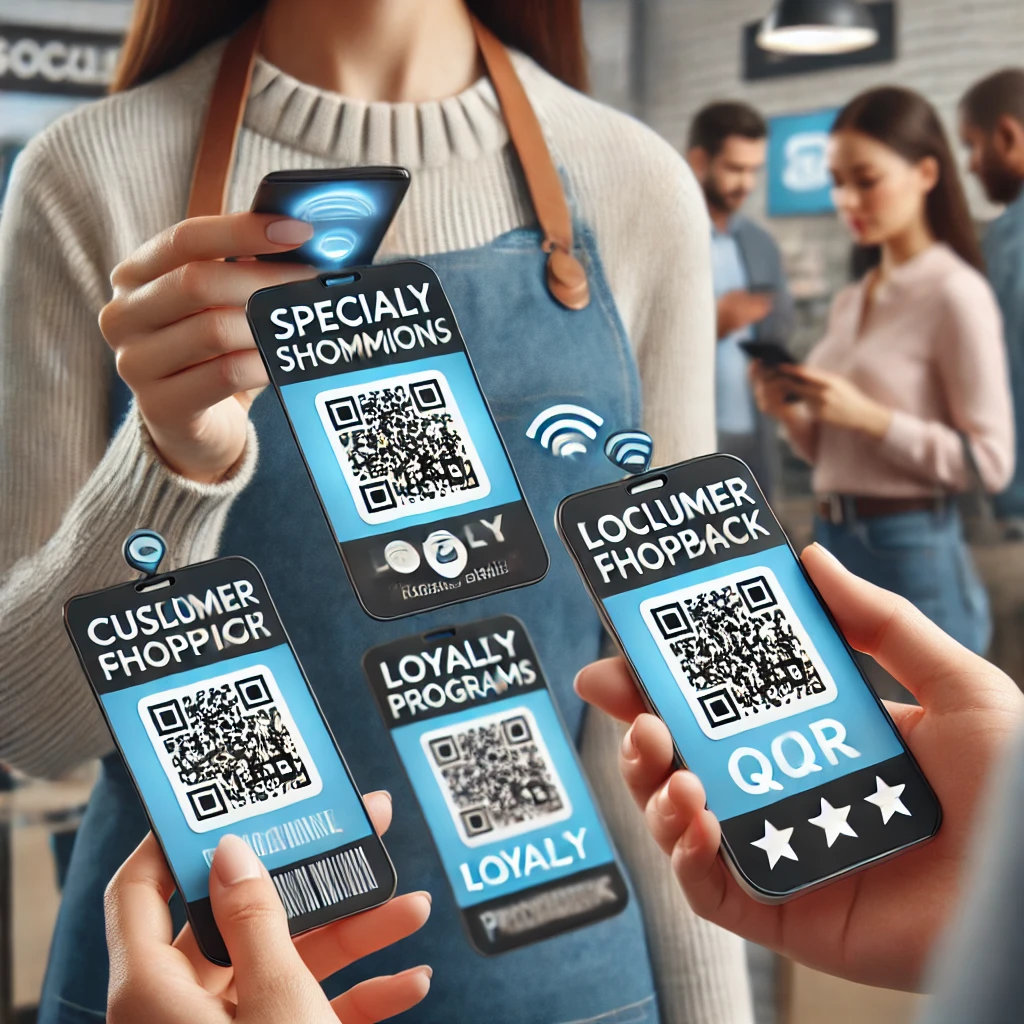
Retail Staff Badges: Retail employees can wear QR code badges that link to special promotions, loyalty programs, or customer feedback forms. Shoppers can quickly scan the badge to access exclusive deals or provide feedback, enhancing their shopping experience.
Best Practices for Using QR Code Badges
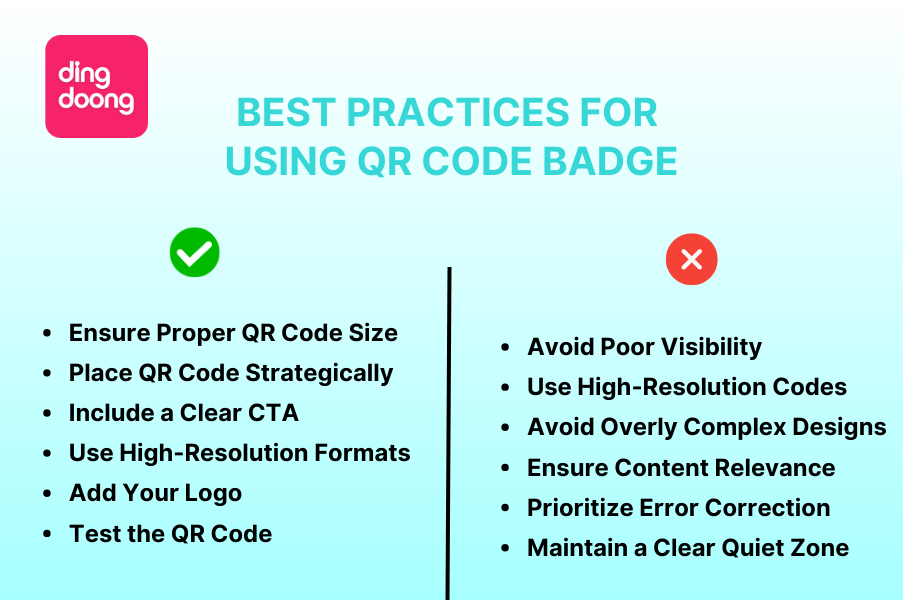
When creating a QR code badge, following some best practices can ensure your code is effective and easy to use. Here’s what to do—and what to avoid:
Do:
- Ensure Proper QR Code Size: Your QR code should be at least 2cm x 2cm in size to ensure it’s scannable.
- Place QR Code Strategically: Position the QR code in a prominent spot on the badge where it’s easy to scan, such as the bottom or side.
- Include a Clear Call-to-Action (CTA): Add a simple instruction like “Scan Here” to encourage people to use the QR code.
- Use High-Resolution Formats: Download your QR code in a high-resolution format to ensure it prints clearly and is easy to scan.
- Add Your Logo: Incorporate your brand’s logo into the QR code to enhance brand recognition and make the badge look more professional.
- Test the QR Code: Always check that the QR code works properly before using or distributing the badges. Test it with different devices and in various lighting conditions.
Don’t:
- Avoid Poor Visibility: Don’t place the QR code in a spot that’s hard to reach or scan, such as near the edges or in a crowded design.
- Don’t Use Low-Resolution Codes: A blurry or pixelated QR code is difficult to scan. Always ensure the code is crisp and clear.
- Avoid Overly Complex Designs: Don’t design your QR code in a way that blends it into the background or makes it hard to distinguish from other elements.
- Ensure Content Relevance: Make sure your QR code directs users to the correct and relevant content. Avoid incorrect or outdated links.
- Don’t Skimp on Error Correction: Use a QR code generator that offers good error correction to ensure the code remains scannable even if slightly damaged.
- Maintain a Clear Quiet Zone: Leave enough white space (quiet zone) around the QR code to avoid interfering with its scannability.
FAQ
- Can QR codes have a logo?
Yes, QR codes can include a logo. Adding your logo to a QR code, such as on a QR code badge, enhances brand recognition while still keeping the code scannable. Just ensure that the logo doesn’t cover too much of the code, so it remains functional.
- Do people put QR codes on banners?
Absolutely! QR codes are commonly placed on banners to direct people to specific digital content. Similar to how a QR code badge works, a QR code on a banner provides easy access to websites, promotions, or contact details with just a quick scan.
- Can you put a QR code in a logo?
Yes, you can integrate a QR code into a logo design, but it’s important to maintain the code’s scannability. For example, when creating a QR code badge, you can incorporate the QR code into the logo or place the logo within the QR code. Just be sure the QR code is still easy to scan.
Conclusion
The QR code badge is a versatile and powerful tool that can enhance your professional networking, streamline processes, and reduce your reliance on physical materials. Whether you’re attending an event, managing a workplace, or simply looking for a modern way to connect, a badge with a QR code offers a smart, efficient solution. By following the steps and best practices outlined above, you can create a QR code badge that not only looks great but also works seamlessly, helping you make the most of every interaction.
Try DingDoong Free
Add a date picker to your Shopify checkout today — no developer needed.
Start free trial →
![12 Rental Dress Business Ideas [2026 Trends Updated]](https://dingdoong.io/wp-content/uploads/2026/09/rental-dress-business-ideas.png)