Great news for our Shopify Plus merchants!
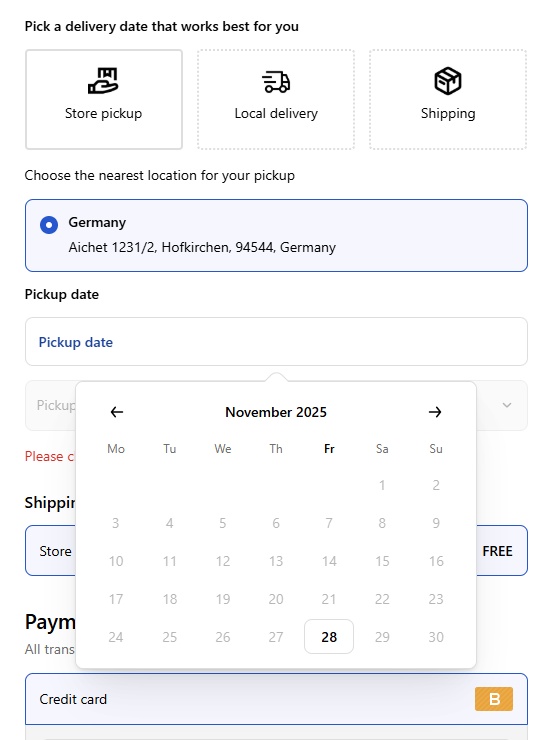
We are thrilled to announce a major update designed to streamline your operations and elevate your customer experience: DingDoong now supports an exclusive Date Picker directly within the Shopify Checkout.
For high-volume stores, every step in the checkout process counts. Previously, customers often had to select dates on the cart page. If they forgot, they had to navigate backward – a friction point that can hurt conversion rates.
With this update, customers can select their delivery or pickup date and time slot directly in the checkout flow, without ever leaving the page.
Why This is a Game Changer
By moving the scheduling logic to the checkout, you ensure a professional, native feel for your store.
💎 Seamless Experience: Keep customers moving forward. No more navigating back to the cart to fix a missing date.
💎 Data Accuracy: Every order captures complete and accurate scheduling information before submission, drastically reducing the need for follow-up emails.
💎 Reduced Errors: Minimize the risk of operational headaches caused by incomplete order data.
The best part? DingDoong’s Checkout Date Picker follows the exact logic you’ve already set up in your store. You can tailor the checkout experience to match your real operational needs.
How to Get Started (+ A Special Offer)
This feature is exclusive to the DingDoong Enterprise plan due to the advanced Shopify Functions required to run it.
If you are a Shopify Plus merchant, there has never been a better time to upgrade your delivery scheduling. To celebrate this launch, we are offering a limited-time deal:
Ready to set it up? Check out our step-by-step guide here: 👉 How to enable Date Picker for Checkout
We’re Here to Help
Transitioning your date picker to the checkout is a big step, and we want to ensure it goes smoothly. If you need help with the setup or want advice on the best configuration for your store, just hit reply or ping us in the live chat. We’ll support you every step of the way.
Happy selling!
Try DingDoong Free
Add a date picker to your Shopify checkout today — no developer needed.
Start free trial →